Start-up launching its SaaS
A first version designed without interface debt: tested journeys, key screens and a lightweight library that grows with the product.
UX/UI design makes software feel obvious: journeys that follow the logic of the job, readable screens and components that stay consistent from one page to the next. We design these interfaces for B2B SaaS vendors and business applications alike, then structure them into a design system your developers reuse.
UX decides what the user needs to do and in what order; UI decides how they see it. UX/UI design covers both: information architecture, journeys, wireframes, then the final interface with its empty, error and loading states. A polished screen that answers the wrong question is still a bad screen, hence the order we follow.
The design system is the logical next step. It gathers components, colour and typography tokens, usage rules and examples, in Figma as well as in code. For a vendor constantly adding features, it stops every new screen from inventing its own buttons, its own tables and its own error messages.
This service is for teams launching a product, for those whose interface has fragmented over successive releases, and for companies that want a business tool that is finally pleasant to use. Common mistakes: starting with a high-fidelity mock-up, copying a generic library without adapting it to the domain, or delivering an undocumented design system that the team ends up working around.
UX/UI design meets different needs depending on the product’s stage.
A first version designed without interface debt: tested journeys, key screens and a lightweight library that grows with the product.
Several teams, several eras, several styles. We inventory what exists, unify the components and redesign the interface module by module.
An internal tool used for hours a day, where every click saved matters. We design it from observation of real workstations.
Copilot, suggestions, automations: these features need screens that explain, reassure and leave the user in charge.
From screen skeleton to documented component, each deliverable sets up the next.
How menus, objects and tasks are organised, tested on paper with your users before a single pixel is produced.
Greyscale mock-ups to validate content, hierarchy and actions, without a premature debate about colours.
Final screens with all their states: empty, loading, error, restricted permissions, long data. These are often what shapes perceived quality.
Components, tokens, accessibility rules and usage examples, kept in sync between Figma and code so your developers become more autonomous.
Clickable journeys in Figma, put in front of a few users in a workshop or remotely, so you fix things before development rather than after.
We can also build the interface we design: the design system then becomes a real component library, not an intention left behind in Figma.
Everything is delivered in Figma and, if we build it, straight into your application’s code.
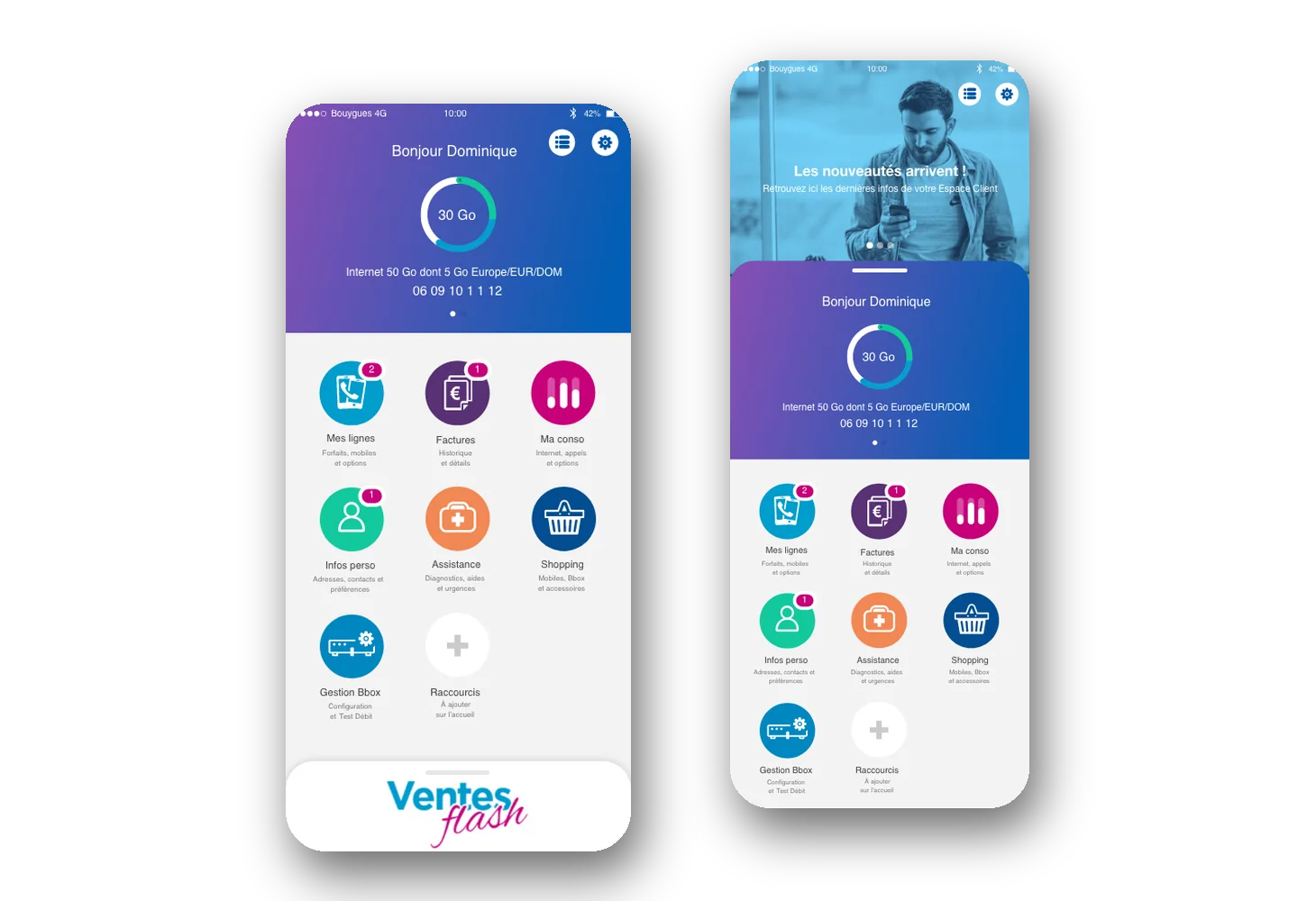
Consistent screens rest on a system, not on goodwill. For the Bouygues Telecom app, used by fifteen million customers, Victor Michel, the studio’s founder, built a complete design system, with tokens, components and guidelines maintained throughout the project, after card sorting with users and several rounds of validation. That link between structure, components and real use is what we deliver.
A sequence that locks in decisions in the right order, from the most structural to the most visual.
User interviews and observation, an inventory of existing screens, the vocabulary of the field: we start from their reality, not ours.
Site map, core journeys and low-fidelity wireframes, discussed with your teams and put in front of a few users.
High-fidelity interface, typography, colours, iconography and every screen state, checked for legibility and contrast.
Extraction of recurring components, documentation of the rules and handover to developers, with support throughout implementation.
The choices that separate a good-looking mock-up from a product that lasts.
A UI kit is a set of ready-made visual components. A component library organises them in Figma or in code. A design system goes further: it adds design tokens, usage rules, vocabulary, accessibility principles and the way the whole thing evolves. For a start-up, a UI kit adapted to the domain is often enough at first. As soon as several designers or several development teams are involved, only a documented design system stops each module inventing its own rules.
Design tokens name visual decisions: colours, typography, spacing, radii, shadows. Organised in tiers, from raw values to semantic uses such as “secondary text” or “alert background”, they let you change a theme or add a dark or high-contrast mode without touching every screen. In Figma they take the form of variables; on the development side, they are exported into code. Set up from the start, they make every brand or product change simpler.
A generative AI feature, or an agent acting on the user’s behalf, raises new design questions. What do you show while the model works? How do you flag an uncertain answer? Where does the user approve before an action goes ahead? We design these screens on the principle of our CRAFT method: the human stays in the loop. In practice, that means suggestions placed in the working screen rather than an isolated chatbot, visible sources, reversible actions and a record of what the AI proposed.
Since June 2025, the European Accessibility Act has extended accessibility requirements to several categories of consumer-facing digital products and services, with the EN 301 549 standard, which builds on WCAG, as the technical reference. Even B2B software has every reason to prepare: its users work on varied screens, in varied conditions, and expect a legible interface. Building contrast, focus order, target sizes and explicit labels into design system components costs little; fixing an entire application afterwards costs far more.
A badly named button, an ambiguous status or a technical error message can ruin a well-composed screen. UX writing, choosing the words in the interface, is therefore part of our UX/UI design work: action labels, statuses, contextual help, empty states, confirmations. We start from your users’ vocabulary, gathered in interviews, rather than internal jargon. These writing rules then go into the design system, so future features speak the same language.
The three most common options for a UX/UI design and design system project, compared honestly.
| Criterion | Brutux Studio | Traditional UX/UI agency | Freelance UI designer |
|---|---|---|---|
| Starting point | User research and journeys, before any mock-up | Research then design, depending on budget | Often straight to mock-ups |
| Design system | Tokens, components and documentation, in Figma and in code | Figma library, more or less documented | Figma UI kit, rarely documented |
| User testing | Workshops and prototype tests at every key stage | Included in the most complete packages | Rare, for lack of time |
| Development | Possible with the same studio, design system included | Usually handed to another team | Rarely offered |
| Point of contact | One senior designer, no middlemen | Project manager and a rotating team | One designer, alone |
| Typical duration | 2 to 6 months, in 6-week cycles | Depends on scope | Depends on availability |
UX/UI design and design system: answers to the questions we are asked.
UX design deals with logic: which tasks, in what order, with what information. UI design deals with presentation: visual hierarchy, components, colours. The two are decided together, but UX always comes first.
As soon as several people design or build screens, yes. Even a modest one prevents inconsistencies and speeds up every new feature. For a very first prototype, a lightweight library is enough.
Yes. We deliver mock-ups, components and documentation in Figma, organised so your teams can find their way without us. Tokens can also be exported into your application’s code.
Yes, and it is a common situation. We start from what exists, spot duplicated components and problem screens, then build the design system while gradually redesigning the interface.
Yes, from the wireframes: sufficient contrast, text sizes, keyboard navigation, explicit labels. It is easier to build in from the start than to fix once the interface has been developed.
That is exactly our SaaS design and redesign format: Brutux Studio runs the user research, designs the interface and the design system, then builds the product with AI-augmented development. The design system does not stay in Figma: it becomes your application’s component library.
Yes. Scoping workshops, prototype tests, sprint reviews: your teams and your users stay in the loop, from the first sketch to production. Tests take place at your offices or remotely, with screen sharing.
It depends on the number of existing screens and components. A design system is usually built during a design or redesign project, over 2 to 6 months in 6-week cycles, rather than as a standalone project cut off from real screens.
We design interfaces that work on mobile and tablet: responsive versions of your SaaS, screens for field use, journeys tested on smartphones. The design follows each platform’s conventions, with suitable touch targets and minimal typing.
Yes: contextual copilot, suggestions, search across your documents or automations. We design the screens that show what the AI suggests, let users check and correct it, and always leave the final decision to them.
30 minutes to talk about your project, in Thonon or by video call. I’ll tell you honestly what will make the difference.
Book 30 minutes ↗