Established software vendor
Your software has loyal customers, but the interface has piled up generations of screens. New customers take too long to get started, and your teams spend more time fixing than innovating.
A SaaS redesign becomes necessary when every new feature makes the product harder to use and to maintain. We start from what your users actually do to strip out the superfluous, clarify the screens and put a design system in place, migrating step by step while your customers keep working.
The warning signs are similar from one product to the next: onboarding that requires a call to support, tickets that keep coming back to the same screens, sales reps who avoid certain areas in demos, and developers wary of touching one component in case they break three others. At that point, adding features only makes things worse.
A SaaS redesign is for vendors whose product is a few years old, with several generations of screens and an established customer base. It also suits companies that have acquired or inherited software and need to modernise it without losing the people who rely on it every working day.
The most expensive mistake is the “big bang” redesign: months of parallel work, then an abrupt switchover that throws long-standing users off balance. We prefer a migration driven by the journeys that matter most, with a design system that gradually replaces legacy components, batch by batch.
A B2B SaaS redesign answers different situations; these are the ones we meet most often.
Your software has loyal customers, but the interface has piled up generations of screens. New customers take too long to get started, and your teams spend more time fixing than innovating.
You inherited software whose original team has left. You need to understand what it really does, who uses it and how to modernise it without losing the know-how it contains.
Several teams built different parts of the product, each with its own conventions. Your customers notice: buttons, tables and wording change from one module to the next.
You want to add generative AI features, but the current interface has no room for them. A redesign is the moment to rethink the journeys where AI genuinely saves time.
Four interventions, to combine according to the state of your product and your code.
Analytics, support tickets and interviews cross-checked to pinpoint the screens that waste time, and the ones nobody opens any more.
Duplicate actions merged, statuses made readable, navigation reorganised around frequent tasks rather than around the feature org chart.
Documented components designed to coexist with the existing interface during migration, then replace the old screens one by one.
Front-end rebuild, targeted back-end refactoring where needed, frequent releases and the option to roll back at every step.
What you have in hand as your SaaS redesign progresses, batch after batch.
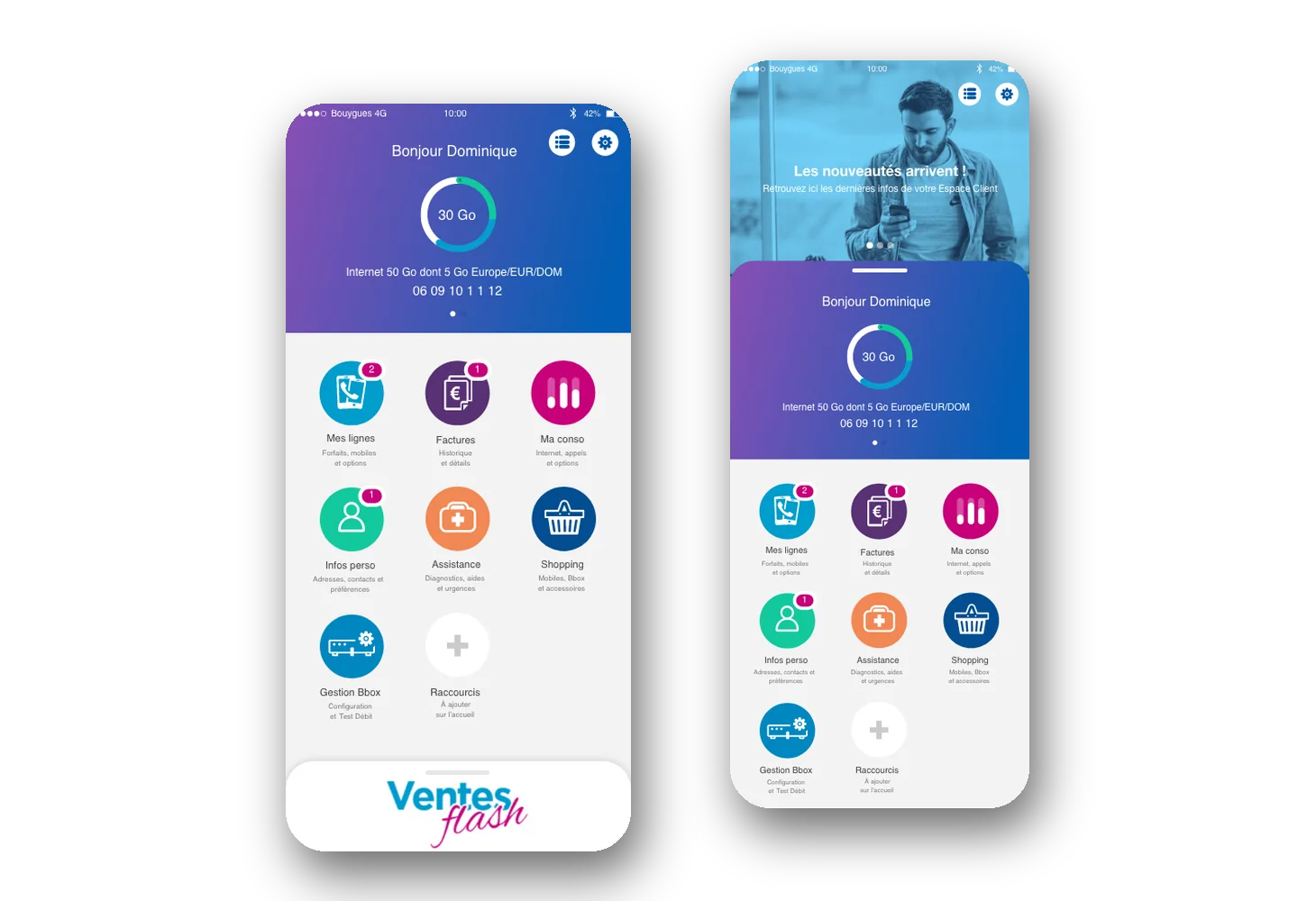
A successful redesign modernises a product without unsettling the people who rely on their habits. That was the challenge Victor Michel, the studio’s founder, took on for the Bouygues Telecom mobile customer area, fifteen million users: an audit of the existing product, an information architecture reworked with users, a design system built from scratch and a progressive rollout. Your SaaS deserves the same care.
No months-long tunnel: every stage delivers an improvement your users can see.
Over 2 to 3 weeks, we document friction points, neglected screens and interface debt, then rank the workstreams by effort and expected impact.
A revised information architecture, wireframes of critical journeys and design rules shared with your product and engineering teams.
In each 6-week cycle, a set of screens moves to the new interface; the old one stays available until the new one has proven itself.
Usage, tickets and customer feedback are tracked after each batch, so we can correct quickly and decide on the next area to redesign.
The points that separate a redesign your customers welcome from one they have to put up with.
A “big bang” redesign promises a clean break: rebuild everything on the side, then switch over. In practice, it ties the team up for months, drifts away from the product in production and concentrates all the risk on a single day. A gradual redesign, batch by batch, delivers sooner, lets you correct course and gives users time to adapt. It does require discipline: a design system able to coexist with what is already there.
Before building, we show the new screens to real users in moderated tests: a real task, no help, watching where they hesitate. After development, a few volunteer accounts get early access to the new interface, with the option of switching back at any time. We then compare time on key tasks, errors and support requests before rolling it out to everyone.
In a SaaS that grew quickly, a share of the screens, columns and options are almost never used. Removing or grouping them lightens the interface more reliably than a new visual style. Usage data and interviews show what matters; sales and support show what wins deals and what makes people call. A redesign starts with this honest inventory, screen by screen.
A design system is not a library of pretty buttons. It is a set of components, rules and tokens shared between design and development, which ensures that a table, a status or a form behaves the same everywhere. Built well, it speeds up your developers, including when they use AI code generation tools, which then reproduce consistent components rather than variants.
A redesign is the right time to deal with contrast, keyboard navigation, text sizes and readable statuses. Accessibility requirements are tightening in Europe, notably with the European Accessibility Act, applicable since June 2025 to certain consumer products and services, and large accounts increasingly include them in tenders. Building them into the design system costs far less than retrofitting them screen by screen.
For redesigning a live SaaS, the choice of provider changes the very nature of the project.
| Criterion | Brutux Studio (product studio) | Web agency | Dev shop or freelancer |
|---|---|---|---|
| Entry point | A 2 to 3 week usage audit of the real product | New visual identity and mock-ups | Technical takeover or framework change |
| Users | Interviews, moderated tests, early access | Little or no consultation | Rarely in scope |
| Design system | Built to coexist with legacy, then replace it | Static style guide | Technical library with no usage rules |
| Migration | In batches, with rollback possible | Often a single switchover | According to the technical plan |
| Development | Front end handled by us or alongside your developers | Limited to the website or CMS | Core strength, from specifications |
| Measurement | Usage, tickets and feedback tracked after each batch | Rarely planned | Technical metrics |
SaaS redesign: answers to the questions we are asked.
It usually begins with a product audit (2 to 3 weeks), then continues for 2 to 6 months. Because the migration is gradual, your users benefit from the first improvements well before the project ends.
Rarely. When the back end is sound, we rebuild the interface on top of it. We flag fragile technical areas and suggest reworking them only when they block a priority journey.
By involving them: interviews up front, early access to the new screens for a few volunteer accounts, and communication before each switchover. Migrating in batches leaves time to fix issues before rolling out widely.
Yes, it is a common way of working on a redesign. We provide mock-ups, components and specifications, take part in code reviews and can build part of the front end with them.
Choose a provider that starts by observing your users, knows how to design a design system and accepts a gradual migration. Brutux Studio brings product audit, design and front-end development together in one team, so nothing gets lost between mock-up and code.
A web agency excels at marketing websites; a SaaS is a work tool, with roles, dense data and established habits. For the application itself, a product studio is the better fit. For your SaaS marketing site, we also have a dedicated website offer.
In two stages: moderated tests on a prototype before any development, then early access for a few volunteer accounts once the screens are built. We compare key tasks before and after, and only roll out once the pain points are fixed.
That is exactly how we work: the design system is designed, documented and then implemented in your product’s code, by our team or with your developers. The components do not stay in a design file.
Yes, when it serves a specific journey: contextual suggestions, pre-filling, summarising a history. We avoid the chatbot bolted into a corner of the screen. For a broader view of AI across your business, our AI strategy consulting follows the CRAFT method.
30 minutes to talk about your project, in Thonon or by video call. I’ll tell you honestly what will make the difference.
Book 30 minutes ↗