
A SaaS redesign becomes necessary when your product holds back the people who use it, sell it or build it. Five signs are hard to miss: a support team answering the same questions, demos that need a user manual, screens that keep getting heavier, urgent items lost in the noise, and a tech team that no longer dares to touch the code. If you recognise two or more, it is time to audit before you redesign.
A B2B SaaS product does not break overnight. It gets heavier, one feature at a time. Nobody decides to make it complicated, yet that is what happens. The team that knows it inside out no longer sees the friction; new users see it straight away.
This article walks through the five signals, then how to act on them: choosing between a full rebuild and gradual change, running an audit, migrating without disrupting your customers, planning timelines and choosing the right partner.
What are the 5 signs that a SaaS redesign is needed?
None of these signs justifies a redesign on its own. Taken together, however, they show that each new release costs the product more than it brings in. For each one, we explain what it reveals and how to check it in your own product.
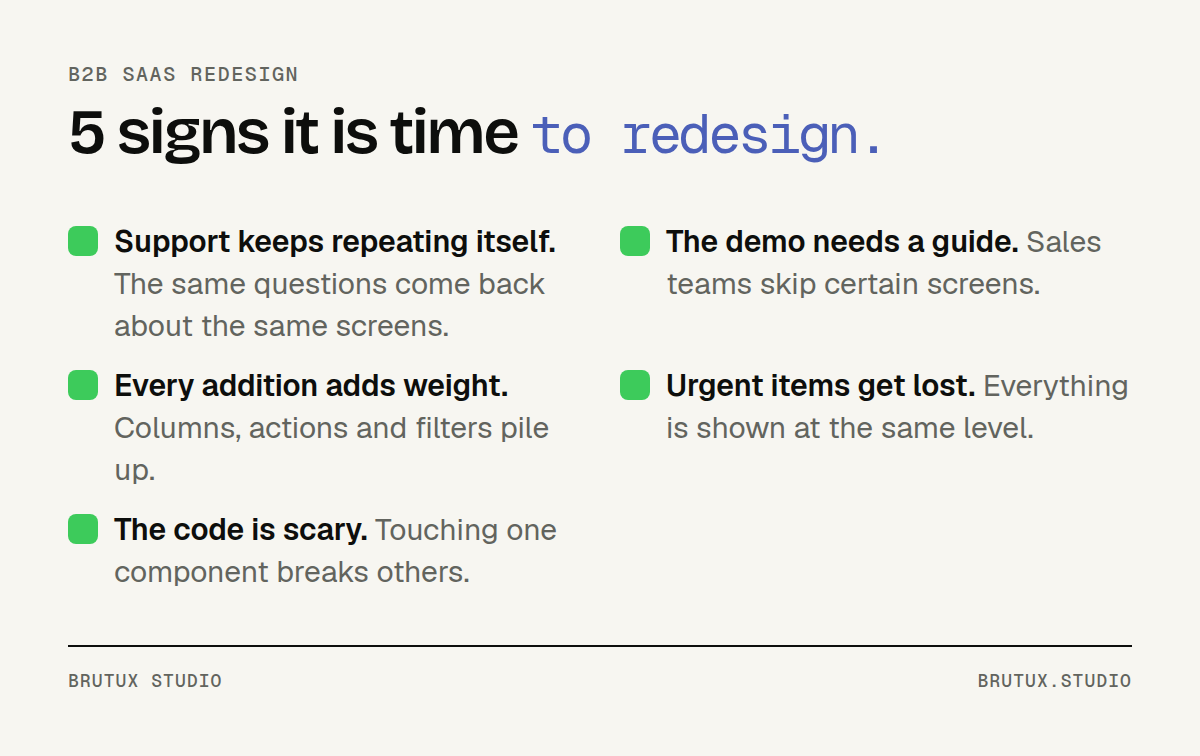 The five signals to watch, across users, sales and engineering.
1. Support keeps answering the same questions
If your users keep asking where a function is, how to carry out a routine task or what a status means, the problem is not them. It is the interface. Every ticket of this kind is friction the product should have prevented.
Nielsen Norman Group describes these as contacts that exist only because the product failed to serve the user, and suggests tracking their volume before and after a journey is redesigned. It is a simple metric to present to leadership.
To check, sort three months of tickets by theme and by screen. The recurring questions draw an exact map of the screens to rework. Talk to your support team as well: they know which screens come up on calls, including the ones that never generate a written ticket.
2. Sales demos need a user manual
A B2B product should make sense within a few minutes of a demo. If your sales team spends half the meeting explaining how to navigate, or skips certain screens because they are too cluttered, the product is slowing down sales.
This signal is often underestimated because it sits between two teams. Product looks at usage, sales looks at conversion, and nobody connects the two. Yet a screen that is hard to present is almost always a screen that is hard to use.
Ask two salespeople to show you their usual demo. Note the screens they avoid, the detours they take and phrases such as "don't worry about that bit". That list is already a first diagnosis.
3. Every new feature makes the screens heavier
Columns nobody reads, duplicate actions, filters only two customers use: clutter creeps in bit by bit. Each addition makes sense on its own, but the whole becomes unreadable.
The instinct is to add a feature to fix a problem. The right instinct is often the opposite: remove what is not used, then set clear priorities for what remains.
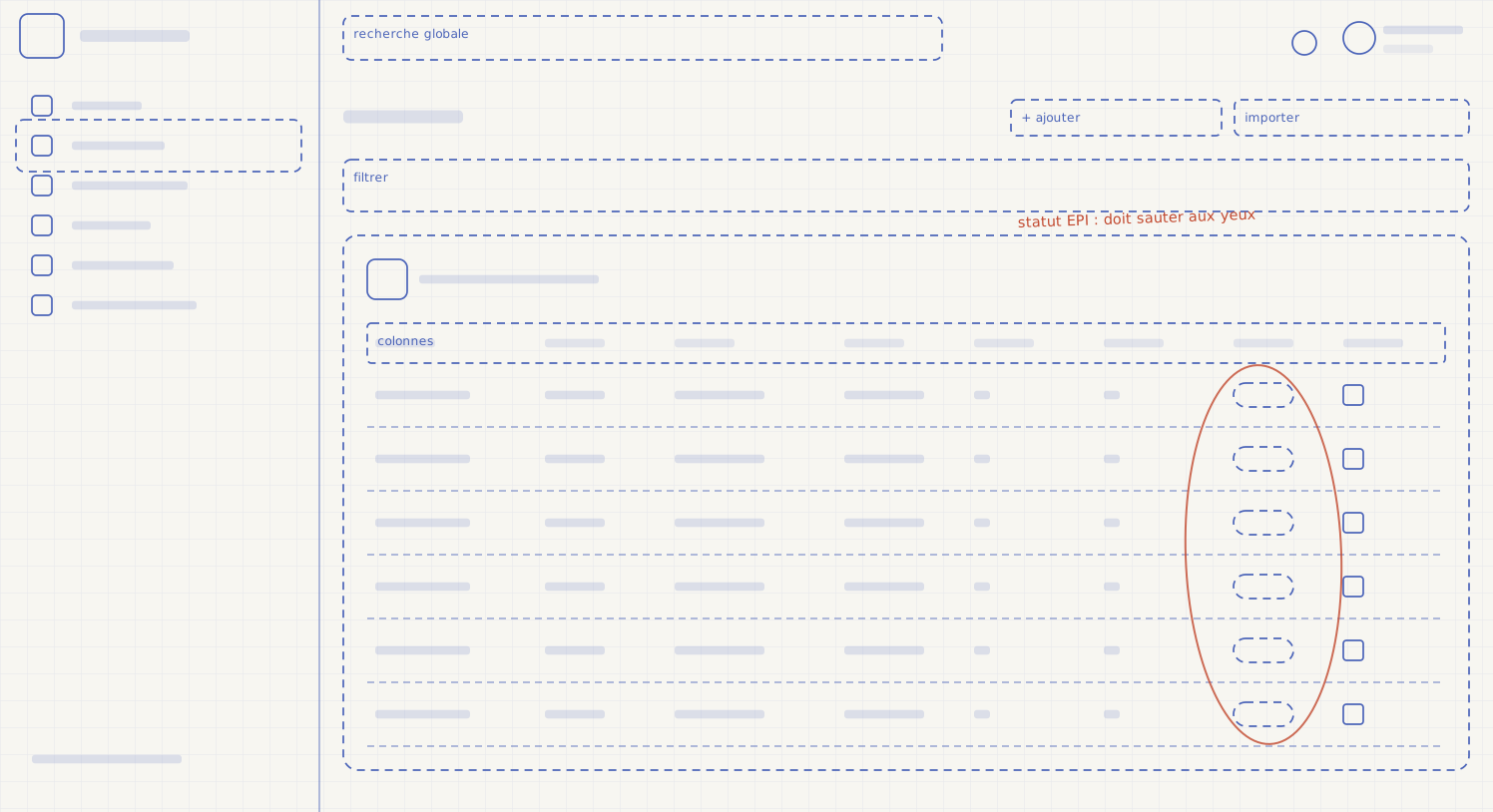
4. Important situations get lost in the noise
When everything is displayed at the same level, nothing stands out. Users have to read everything to find what needs their attention, and end up missing what matters: a deadline, a blocked case, an anomaly.
That is the whole challenge of EPItrack Manager, a SaaS product for managing personal protective equipment, used by site managers and HSE leads. Employees, allocations, stock, inspections and deadlines: a lot of information, for users who need to spot non-compliance quickly.
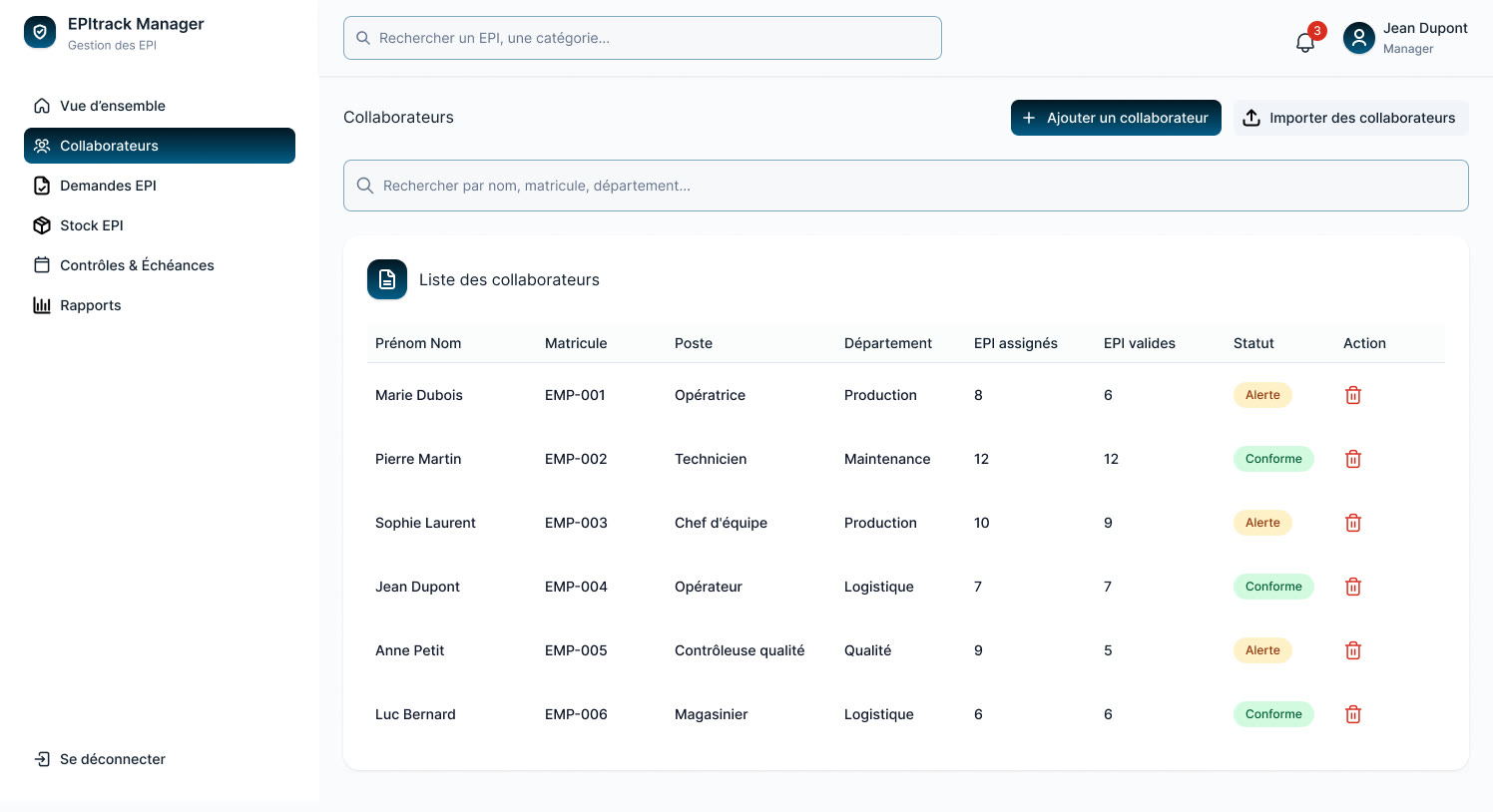 EPItrack Manager: the Employees screen designed by Brutux Studio.
The work focused on information architecture: the screen is organised around people, with readable statuses and a clear hierarchy. Non-compliant situations stand out at a glance. That is exactly what a redesign must fix when the existing screen puts everything on the same level.
5. Your tech team is wary of touching certain areas
When an interface has grown without a shared system, every screen has its own rules. Adding a feature becomes slow and risky, and visual quality varies from page to page. Developers end up working around the fragile areas.
A design system, meaning a documented library of components, tackles this problem at the root. The same buttons, tables and statuses everywhere: the product becomes more consistent for your users, and your teams ship faster. Our page on UX/UI design and design systems sets out what such a deliverable contains.
Full rebuild or gradual change: which should you choose?
The next question is the scale of the work. There are two options: rebuild everything and switch over in one go, or evolve the product step by step. The choice depends on your data, not on the team's preferences.
What the data says before you decide
Nielsen Norman Group recommends making incremental changes and only moving to a full redesign if the data demands it. It also advises measuring the effect of a change on users before rolling it out.
The same institute adds a caveat: piling up small tweaks eventually destroys the consistency of an interface, which then calls for a new architecture. That is exactly the situation the five signs describe: the target needs rethinking, but the path towards it can stay gradual.
Three questions help you decide:
- Is the back end sound? If so, the redesign can focus on the interface and build on what already exists.
- Is the friction concentrated? If a handful of journeys account for most tickets, start with those.
- Does the data model block a priority journey? Only then is deeper technical rework justified.
Why a "big bang" switchover is expensive
A "big bang" redesign means rebuilding in parallel for months, then switching everything over at once. On paper, it looks simpler.
In practice, you maintain two products, you ship nothing to customers during the rebuild, and switchover day throws habitual users off balance.
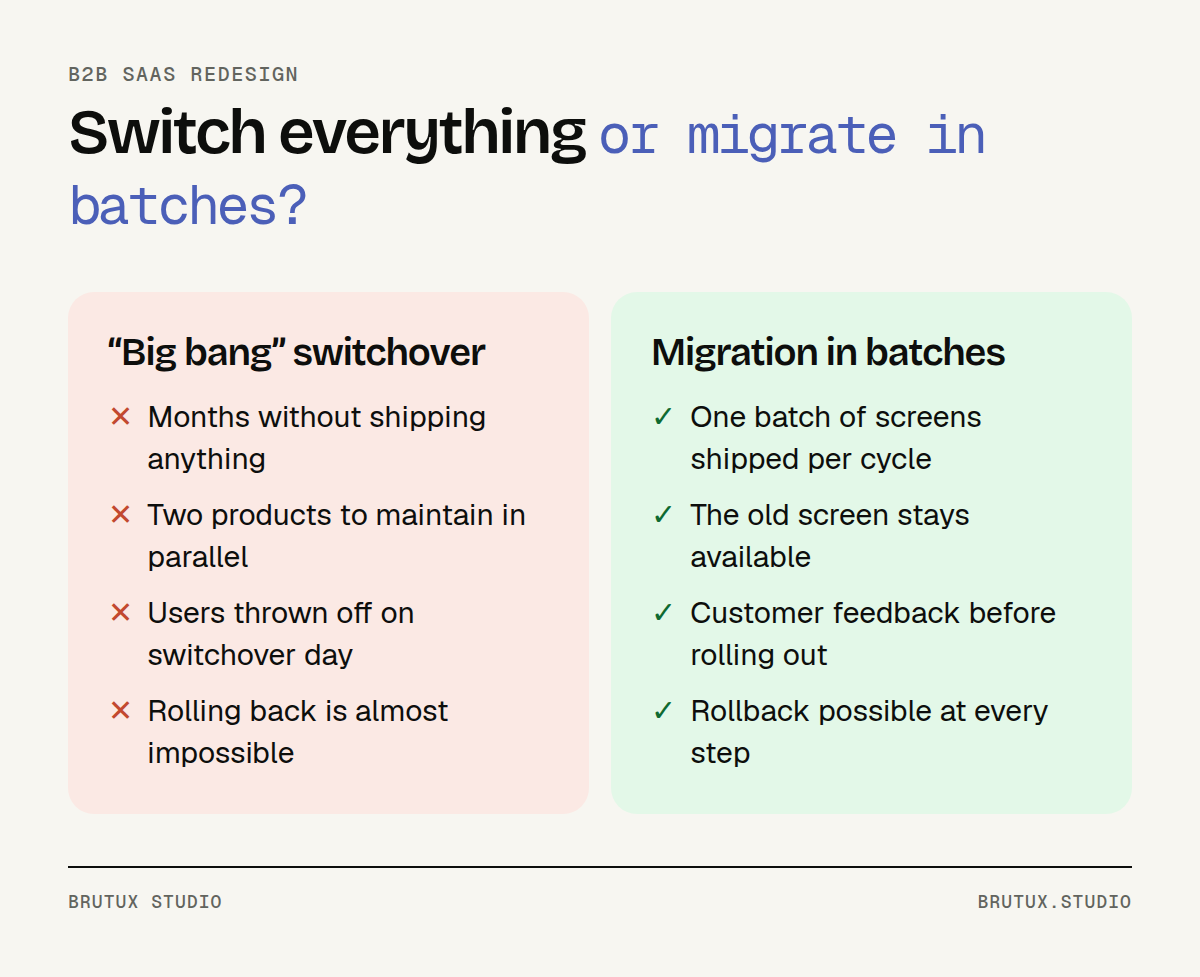 Big bang or migration in batches: the risk is not spread the same way.
A complete rewrite is rarely necessary. In our SaaS redesign approach, when the back end holds up, we rebuild the interface on top of it, and we only propose reworking a fragile technical area when it blocks a priority journey.
How do you audit a SaaS product before redesigning it?
A redesign that starts with mock-ups starts with opinions. An audit replaces those opinions with facts: what users actually do, where they get stuck, and what each fix would deliver.
Cross-check analytics, tickets and interviews
Each data source tells part of the story. Analytics show what happens, without saying why. Tickets show what blocks people, but only those who take the time to write in. Interviews explain the why, for a small number of people.
Combined, they correct one another. A screen that is rarely opened and absent from tickets does not have the same status as a screen that is rarely opened and heavily discussed.
Here is what we record for each journey:
- the most-opened screens, and the ones nobody opens any more;
- the steps where users drop out or go back;
- the ticket themes linked to each screen;
- the workarounds seen in interviews: exports to a spreadsheet, notes on the side, double data entry.
That last point is often the most telling. A user who exports a table every week to rework it elsewhere is telling you precisely what the screen ought to do.
Rank workstreams by effort and impact
The audit produces a list of friction points. Without priorities, that list is paralysing. Each workstream is therefore ranked by the effort it requires and the expected impact for users and for the business.
| Effort | Impact | Decision |
|---|---|---|
| Low | High | Quick win to ship straight away |
| High | High | Core workstream, to split into batches |
| Low | Low | Group with another batch |
| High | Low | Set aside for now |
At Brutux Studio, this UX audit takes 2 to 3 weeks. It ends with a prioritised action plan and quick wins designed as mock-ups, ready for your developers, so the first improvements land before the redesign itself even begins.
How do you migrate without disrupting your customers?
Your customers work in your product every day. The redesign therefore has to happen while they use it, with no data loss and no break in service. Two workstreams move forward in parallel: the interface and the technology.
On the interface side: a transitional design system
The design system is not built at the end, once the screens are drawn. It is built early, and designed to coexist with what is already there: new components replace old ones screen by screen, without the product looking split in two.
Nielsen Norman Group points out that a design system helps manage design at scale by reducing redundancy, but that it requires ongoing maintenance and is not a one-off fix. Decide from the start who will look after it once the redesign is over.
The components to tackle first are the ones found everywhere in a B2B SaaS product:
- data tables, with sorting, filters and bulk actions;
- statuses and badges, which should be readable without a legend;
- forms and their error messages;
- empty, loading and error states.
Accessibility is handled at this stage, inside the components, rather than as screen-by-screen fixes. WCAG 2.2, the W3C Recommendation published in October 2023, adds, for example, criteria on minimum target size and on keyboard focus not being obscured.
On the technical and data side: replace piece by piece
The safest pattern has a name: the strangler fig. Microsoft describes it as an incremental migration of an existing system, in which a façade routes each request to either the old or the new implementation. Users keep the same entry point throughout the migration.
In practice, every batch follows the same path: the new screen is built, opened to a few accounts, compared with the old one, then rolled out. The old screen stays available until the new one has proved itself, and rollback remains possible at every step.
This approach echoes the work of Google Cloud's DORA programme, for which working in small batches is an essential principle whenever you want to learn quickly from your decisions. A redesign is the textbook case: every batch you ship teaches you something about the next one.
That leaves the question of data. For designing and testing new screens, France's data protection authority, the CNIL, recommends working in an environment separate from production and using fictitious datasets wherever possible rather than real personal data. That is how we work, with fictitious or anonymised data, and in line with your rules on environment access.
What timelines should you plan for, and who should be involved?
A redesign does not have to be a tunnel. Well organised, it delivers improvements your users can see long before it is finished. The schedule depends mainly on the size of the product and the state of its code.
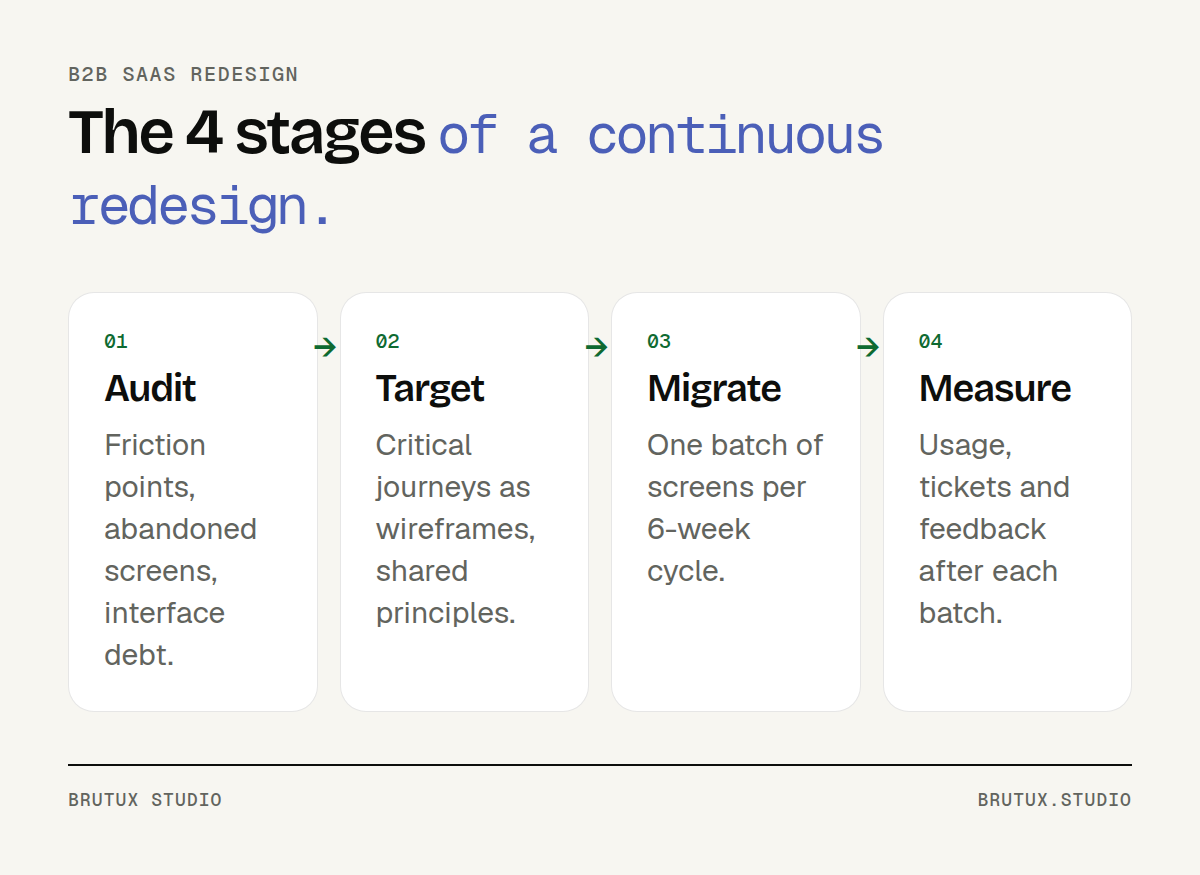 Audit, target, migrate, measure: a loop that repeats with every batch.
A schedule built on 6-week cycles
At Brutux Studio, a redesign usually starts with the 2 to 3-week product audit, then continues for 2 to 6 months. The work is organised in 6-week cycles, and each cycle moves a set of screens over to the new interface.
The process follows four stages:
- Audit: friction points, abandoned screens and interface debt documented, workstreams ranked.
- Target: information architecture reviewed, wireframes of critical journeys, principles shared with your teams.
- Migrate: one batch of screens per cycle, with frequent releases to production.
- Measure: usage, tickets and customer feedback tracked after each batch, to choose the next scope.
This rhythm also leaves room for new improvements. Once the screens are clearer, some repetitive tasks can be handed to AI, provided it is placed in the right spot: we cover this in our article on where AI really creates value in a B2B SaaS product.
Support your long-standing users
Nielsen Norman Group observes that any new interface draws complaints, especially from daily users whose actions have become automatic. These reactions do not mean the redesign is wrong. They mean it needs to be supported.
Three practices soften the shock:
- involve customers from the audit onwards, through interviews;
- give a few volunteer accounts early access to the new screens;
- give notice before each switchover, explaining what is changing and why.
Migrating in batches also leaves time to fix issues before rolling out further. The landmarks that matter to your users are kept, and changes are only extended once the first feedback is positive.
How do you choose a partner for your SaaS redesign?
Redesigning a product in production puts your customer relationships on the line for several months. The choice of partner matters as much as the method. A few criteria let you compare proposals on substance.
First, the starting method. A serious partner begins by understanding real usage, with data and users, before showing any mock-ups. Be wary of a proposal that presents finished screens before a single interview has taken place.
Second, the ability to work with your developers. A redesign is carried out with them, not alongside them.
On a redesign, we provide mock-ups, components and specifications, we take part in code reviews and we can build part of the front end with your team. That way, the know-how stays with you once the project ends.
Finally, the deliverables. Ask what you will actually receive: organised design files, a documented design system, a batch-by-batch migration plan, tracking metrics. A report without mock-ups or priorities soon gathers dust in a folder.
Proximity matters too, especially for scoping workshops and user testing. From Thonon-les-Bains, we work with teams looking for a SaaS agency in Geneva, where products are often multilingual and subject to strict approval processes, as well as those looking for a SaaS agency in Lausanne, on the other side of the lake.
If your product shows two or more of the five signs described here, do not wait for a sixth to appear: book 30 minutes to talk it through, and come away with a first reading of your priorities.
Sources
- Nielsen Norman Group, Stop Reporting UX Activity and Report Business Outcomes: support contacts caused by product failure, to be measured before and after a redesign.
- Nielsen Norman Group, Radical Redesign or Incremental Change?: favour incremental changes unless the data demands a full redesign.
- Nielsen Norman Group, Fresh vs. Familiar: How Aggressively to Redesign: accumulated tweaks destroy consistency; complaints after a new interface.
- Nielsen Norman Group, Design Systems 101: definition and ongoing maintenance of a design system.
- W3C, What's New in WCAG 2.2: new accessibility criteria in the October 2023 Recommendation.
- Microsoft Learn, Strangler Fig pattern: incremental migration of an existing system behind a façade.
- DORA, Working in small batches: working in small batches to learn quickly from your decisions.
- CNIL, Sécurité : encadrer les développements informatiques (in French): separate environments and fictitious datasets for development and testing.