
A SaaS design system is the set of components, rules and visual decisions that everyone who designs or builds your product reuses. With it, a design decision is made once and then serves every screen. The right moment to build one comes when several people ship screens in parallel, and at that point it is better to start small than to aim for completeness.
Before that threshold, a light library is enough. After it, every month of waiting adds inconsistencies you will have to fix. Here is how to place your product, where to start, what the system should contain and how to keep it from being abandoned after a year.
What is a design system for a SaaS product?
Nielsen Norman Group defines it as a set of standards for managing design at scale, made of reusable components and patterns (Nielsen Norman Group). The key word is "scale": a design system only pays off when several screens, several people or several teams must stay consistent.
In a SaaS product, that scale arrives quickly. Every sprint adds a screen, a filter, a dialog or a new status. Without a shared reference, each addition is a small design decision made again, often slightly differently.
More than a component library
Three terms circulate, and they do not mean the same thing. A UI kit is the box of graphic parts. A component library is that box sorted and named, on the design side or the code side. A design system is the box with its instructions: why each part exists, when to use it, who may add a new one.
Public systems show this structure well. The GOV.UK Design System is organised into styles, components and patterns for common tasks, such as entering a name, an address or creating an account (GOV.UK Design System). Patterns are the most valuable part: they explain how to combine components to solve a real user problem.
In France, the State design system is described as a set of reusable components governed by standards and a governance process; it has been mandatory for State websites and mobile apps since July 2023 (info.gouv.fr). Standards and governance: exactly what crumbling libraries lack.
What it changes for a B2B SaaS product
Nielsen Norman Group describes the problem it solves: without a system, large organisations end up designing and coding several versions of the same element, which brings inconsistency, wasted time and messy code (Nielsen Norman Group). A fifteen-person SaaS company already lives with this problem at its own scale.
For your users, the difference shows every day. A "pending" status with the same colour and label everywhere is read without thinking.
A table that always sorts and filters the same way is learnt once. In a tool used for hours each day, that consistency matters more than an attractive home screen.
For your teams, the gain lies elsewhere: fewer debates over details already settled, faster mockups, and developers who assemble instead of rebuilding. That is what our UX/UI design and design system work covers, from screen architecture to documented components.
When should you build a SaaS design system?
The question is not "do we need a design system?" but "which one, and when?". The same product goes through several stages, and each calls for a different level of formality.
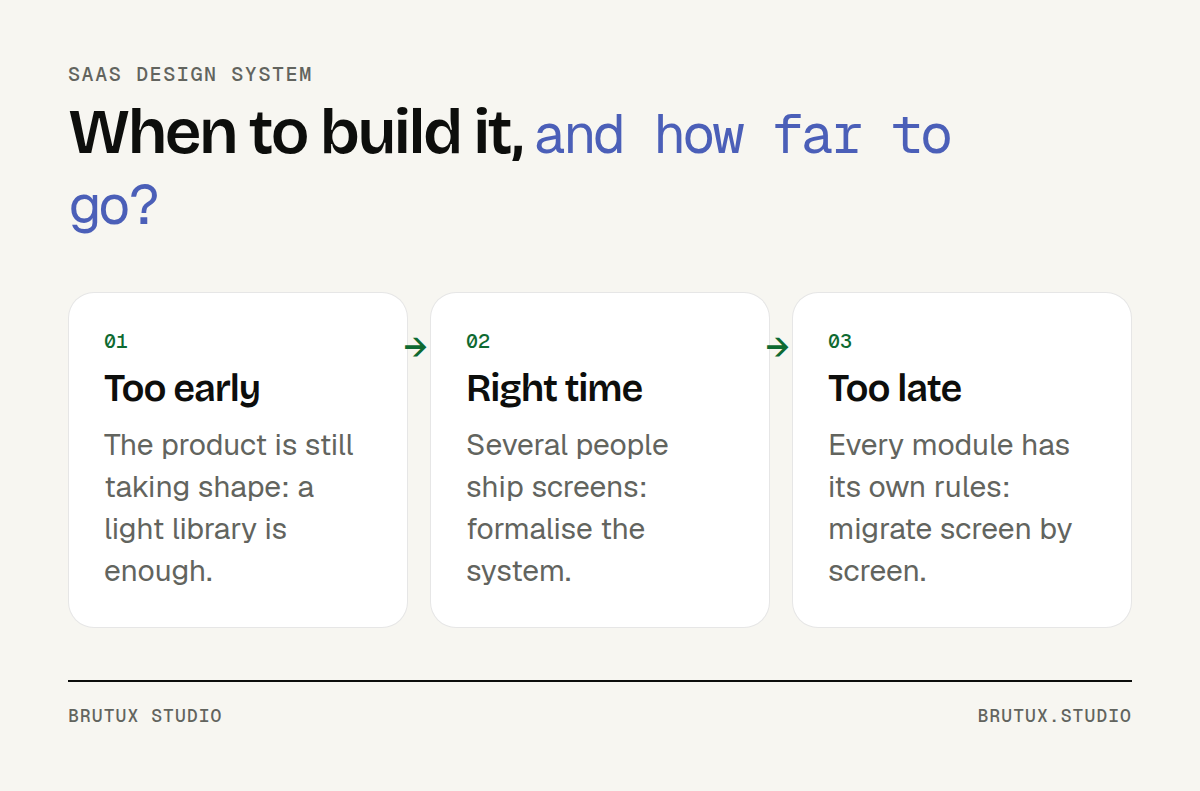 Three moments, three answers: the design system follows the product's maturity.
Too early: while the product is finding its shape
While you are still testing what the product should do, a full system freezes too much. Journeys change from one week to the next, whole screens disappear. Documenting components that will not survive the next user test helps nobody.
At this stage, a light library adapted to your field is enough: a palette, a type scale, a few basic components. The way we work suits this well.
The studio mostly iterates with prototypes built with AI, and the elements that recur from one prototype to the next show what will later deserve a place in the system. It grows out of real use, not out of a catalogue.
If you are at launch stage, our SaaS development page describes how we move from prototype to design and development without piling up interface debt.
The right time: several people ship screens
The most reliable signal is not company size but the number of people producing screens in parallel. Two designers, or a development team that designs some pages itself: inconsistencies begin as soon as two people make the same choice separately.
Other signs point the same way:
- You have three versions of the same component, for instance three ways of showing an error message.
- A new screen takes days of design even though it closely resembles an existing one.
- Developers keep asking "which colour?", "which spacing?", "which label?".
- A client or partner asks for a version in their colours, a dark mode or a high-contrast mode.
At that point, the design system is built during a design or redesign project, on real screens, not as an isolated workstream. With us, these projects last 2 to 6 months, in 6-week cycles.
Too late: every module has its own rules
When a product has grown for years without a shared reference, you must undo before you can build. Each module has its own buttons, tables and implicit rules, and nobody dares touch the oldest areas.
It is not a dead end, but the design system then becomes a migration project: it must coexist with the existing interface and replace old components screen by screen. We cover this situation in our article on the signs that a B2B SaaS product needs a redesign.
Victor Michel, the studio's founder, designed a complete design system from scratch for the redesign of Bouygues Telecom's customer-area app, used by fifteen million mobile customers. Tokens, components and usage guidelines were maintained throughout the project, so that several teams shipped on the same foundation.
Where should you start?
A design system does not begin with a blank page in Figma. It begins with what your product already contains, even if it is messy.
Take stock of what already exists
Capture every screen, then group the elements by family: buttons, fields, tables, badges, dialogs, messages. Simply seeing your seven variants of the primary button side by side is often enough to convince a team.
For each family, note how many variants exist, which are justified and which are accidents. This inventory overlaps with part of a SaaS UX audit, which cross-checks it against the difficulties users actually meet.
The inventory also sets the order of work. The most used and most inconsistent families come first. Those that appear on a single secondary screen can wait.
Set up design tokens
Design tokens name your visual decisions. Material Design describes them as small, reusable design decisions, and splits them into three classes: reference tokens, system tokens and component tokens (Material Design).
In practice, that means at least two levels. First the raw values, such as a precise blue. Then the purposes, such as "link colour" or "field border in error", which point to those values. Screens only use the purposes: changing a colour no longer means touching every page.
This is also what makes themes possible. Atlassian treats light mode, dark mode and high contrast as themes that switch the values of a single token set (Atlassian Design System).
Victor Michel, the studio's founder, designed an industrial design system with high-visibility modes for Metroscope, EDF's predictive maintenance AI for its power plants. Without tokens, this kind of variant quickly becomes unmanageable.
The format is becoming standard. On 28 October 2025, the W3C community group dedicated to design tokens published the first stable version of its specification, a file format for exchanging tokens between tools; it is not an official W3C standard (W3C Design Tokens Community Group).
Tackle first the components that appear everywhere
In a B2B SaaS product, a handful of components carry most of the usage. Start with them rather than with a theoretical list of fifty elements:
- Tables, the heart of most business screens: columns, sorting, multiple selection.
- Status labels, whose colour and word should be enough on their own.
- Input fields, with their contextual help and validation.
- Dialogs and confirmations, especially for irreversible actions.
- Empty states, when a list does not contain anything yet.
On EPItrack, a SaaS product for managing protective equipment designed by the studio, the design system covers the dashboard, tables, statuses, catalogue and product sheets. The same visual code flags urgency levels everywhere: the health and safety manager sees at a glance which inspection is coming up, whatever the screen.
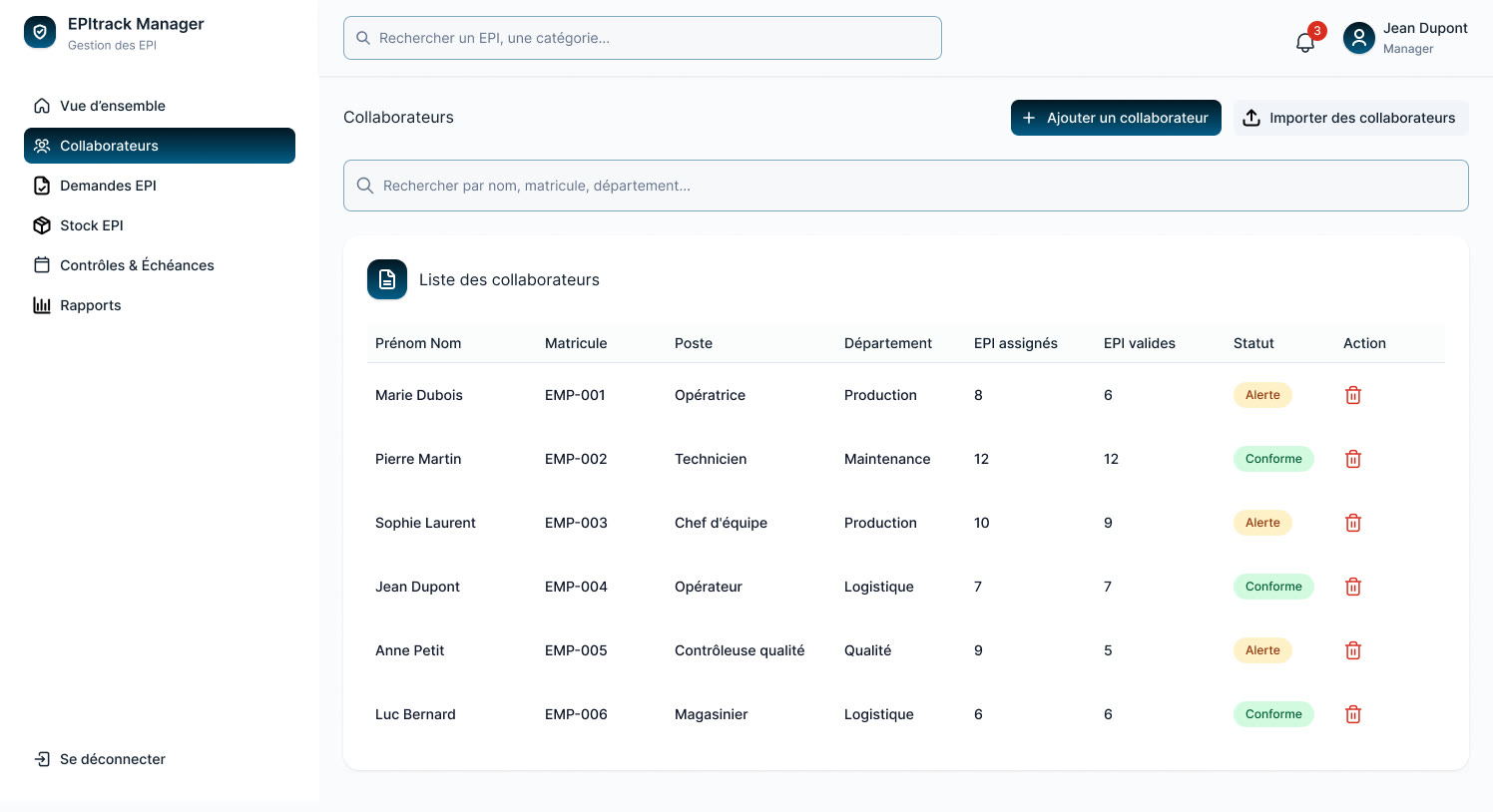 EPItrack: statuses and tables come from the same design system.
What does a complete design system contain?
A useful system rests on four pillars. None is enough alone: components without rules get misused, rules without code remain intentions.
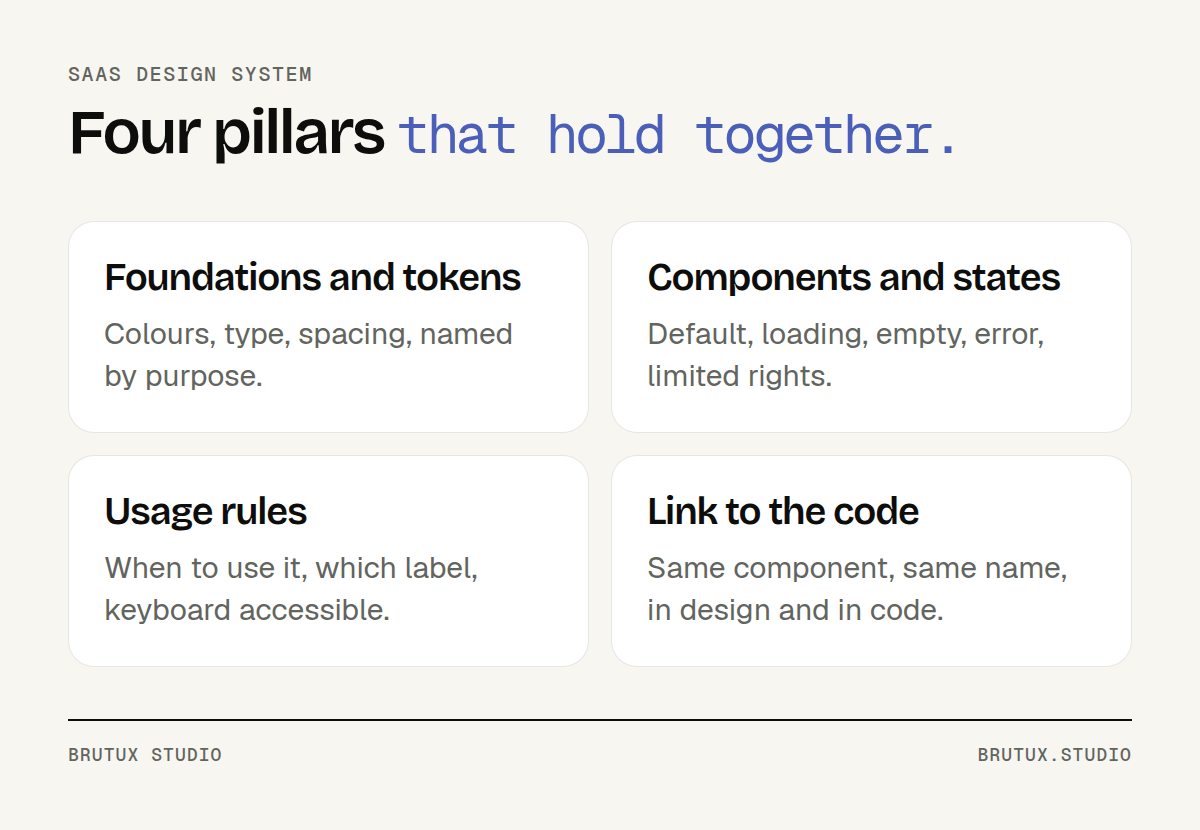 The four pillars of a design system that lasts.
Components with all their states
A component is not a frozen picture. A button has a default, hover, active, disabled and loading state. A table has an empty state, an error state, a no-permission state and a state with very long data.
These states shape the perceived quality of a SaaS product. They are the ones forgotten in mockups, then improvised by each developer. Documenting them once in the system avoids dozens of small decisions made under sprint pressure.
Usage, writing and accessibility rules
Each component needs instructions: when to use it, when to pick another one, with which label. These writing rules belong to the system as much as the colours do.
"Delete" or "Remove"? "Save" or "Confirm"? Settled once, these questions stop coming back at every sprint review.
Accessibility is also handled at this level. WCAG 2.2 requires, at level AA, targets of at least 24 by 24 CSS pixels, with a few exceptions (W3C). Built into the button, the link and the checkbox, the rule applies to every screen without anyone having to think about it.
The same goes for contrast, keyboard focus order and explicit labels. A compliant component repeats its compliance wherever it is used. A non-compliant one repeats the flaw just as faithfully.
A direct link to the code
A design system that only exists in Figma eventually drifts away from the real product. Tokens must be exported to the code, and each component in the design files must match a developed component with the same name.
The simplest arrangement is for one team to both design and build. When the studio also handles development, every component in the mockups exists in your product's code, under the same name and with the same states.
The link with code also helps AI coding agents. An assistant that generates a screen follows a system whose tokens and components are named and documented far better than styles scattered through the code.
Which mistakes to avoid, and how to keep it alive?
Most design systems do not die from a bad start. They die from gradual neglect, when the team finds it quicker to work around the system than to use it.
The mistakes that doom it
These mistakes come up in most projects:
- Using a downloaded kit as is: it knows nothing of your statuses, your tables or your users' vocabulary.
- Starting from the top: a hundred components drawn before a single real screen uses them.
- Shipping without documentation: a component nobody knows when to use will be rebuilt next to it.
- Building it in isolation, away from developers, who discover the result on delivery day.
- Appointing nobody to arbitrate change requests.
The last one is the most common. A system without an owner becomes just another library that everyone extends in their own way, and duplicates creep back in.
Governance sized to the team
There is no need for a committee. You need one person who decides, and a simple rule for deciding. It should fit in a single sentence.
Nielsen Norman Group suggests one: a change that helps three or more teams belongs in the system; if it serves a single case, it is probably an exception, and when in doubt you prototype it with one team first (Nielsen Norman Group).
In a smaller SaaS company, replace "teams" with "screens" or "modules"; the principle stays the same. Add a single channel for requests, a changelog and a short review at the end of each cycle.
This demand is strongest in software where a mistake is costly, in finance or for international organisations. Our UX/UI agency in Geneva page describes how we work with these teams, from Thonon, on their interfaces and component libraries.
Watch for drift
Even well governed, a system drifts: a near-identical colour added in a hurry, a component detached from its source, a silent gap between design files and code. Each gap is invisible on its own, and costly all together.
Desy, a product designed and built by the studio, tackles exactly this problem. The tool reads the code to extract the tokens actually in use, flags what could be merged and tracks how the gaps evolve from release to release. Its output can be passed to AI coding agents, so they work with the system rather than around it.
Without a tool, a quarterly review already goes a long way: compare the tokens in the code with those in the design files, list the components created outside the system, and decide for each whether it joins the system or disappears.
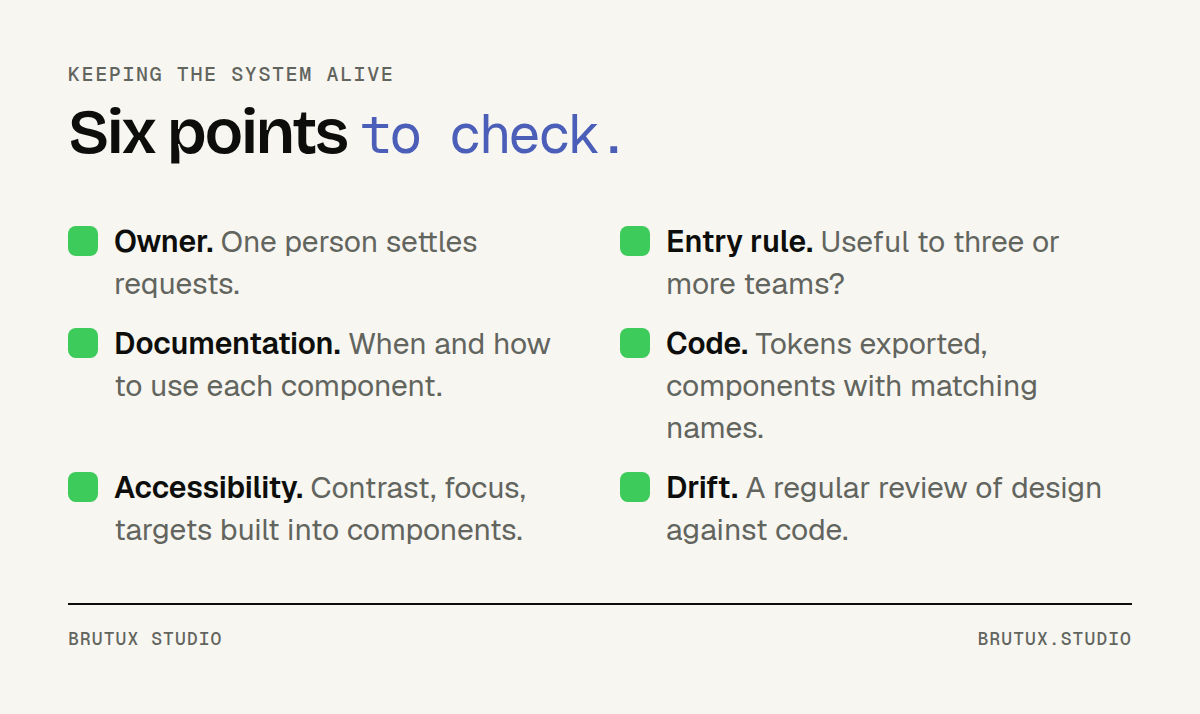 Six points to check so a design system stays in use.
A design system is not a deliverable you file away once finished: it is a working tool that follows the product. Start small, when several people ship screens, and give it an owner from day one. To build it on your real screens, see our UX/UI design and design system offer, or let's talk about your product directly.
Sources
- Nielsen Norman Group: Design Systems 101
- Nielsen Norman Group: Your Design System Needs an Enforcer
- GOV.UK Design System: styles, components and patterns
- info.gouv.fr: the French State design system (in French)
- Material Design 3: design tokens
- Atlassian Design System: design tokens
- W3C Design Tokens Community Group: first stable version of the specification
- W3C: what's new in WCAG 2.2