
A SaaS UX audit analyses, in 2 to 3 weeks, how your users actually use your product: an expert review of key journeys, usage data, support tickets, interviews and accessibility basics. You receive a short list of problems ranked by impact and effort, with the first fixes already mocked up. Every finding rests on an observation, not on a preference.
Many software vendors hesitate to commission an audit because they do not know what they will get. A hundred-page document? Comments about colours? A redesign quote in disguise? The concern is fair, and the answer lies in the method.
This article opens the box: what we look at, in what order, how findings are ranked and what your team holds at the end. You can use it to scope an audit, whether you run it in-house or with a partner.
What is a UX audit, and when should you run one?
The word “audit” suggests an inspection. In UX, it is closer to a diagnosis: understanding what holds usage back before deciding what to change.
An investigation into real usage
A UX audit starts from a simple question: where, and why, do your users lose time? It does not judge the style of the interface. It looks for the moments when someone hesitates, makes a mistake, goes back or abandons a task they came to complete.
In a B2B SaaS product, those moments cost twice. They slow adoption among your customers, and they come back to you as tickets, training requests and drawn-out demos. The audit connects these symptoms to show which ones weigh the most.
It is sometimes confused with two related practices. A usability test observes a few people on specific tasks. An accessibility audit checks conformance with a standard. A UX audit borrows from both, but its goal is to rank all the friction in a product.
When it pays off most
An audit does not need to wait for a crisis. It is especially useful in four situations:
- before a redesign, to decide what to keep, remove or rethink;
- when activation of new accounts stalls despite follow-ups;
- when support keeps answering the same questions;
- when an internal tool is bypassed with spreadsheets and messages.
If you are still wondering whether your product needs a redesign, our article on the signs that a SaaS redesign is due will help you sort it out. The audit comes right after: it turns those signals into a list of workstreams.
What does a SaaS UX audit look at?
No single source is enough. Nielsen Norman Group recommends combining several research methods, so that the limitations of one are offset by data from another. A serious audit therefore brings four lenses to the same product.
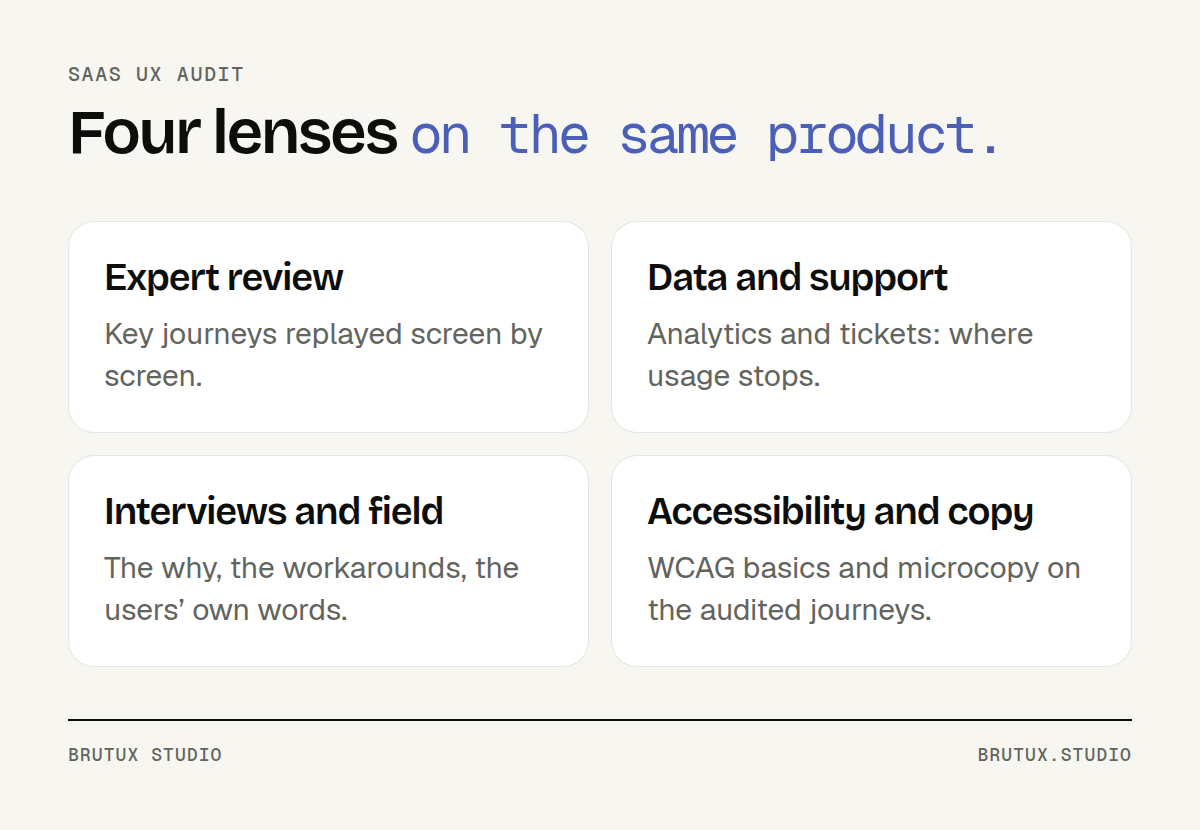 Four sources, one diagnosis: each covers the blind spots of the others.
Expert review of key journeys
We start by replaying the most important tasks, screen by screen: signing up, setting up the workspace, completing the main task, exporting, inviting a colleague. Each point of friction is captured, described and linked to its likely cause.
The best-known framework remains Jakob Nielsen’s 10 usability heuristics: visibility of system status, consistency, error prevention, recognition rather than recall. NN/g presents them as broad rules of thumb, not specific usability guidelines.
An expert review has limits, and you need to know them. NN/g advises having three to five people evaluate the same interface independently, because each one finds different problems. It also points out that these evaluations do not replace observing users.
An expert review therefore produces strong hypotheses. The other sources confirm, refine or rule them out.
Usage data and support tickets
Analytics show what happens at scale: the most visited screens, features nobody uses, the steps where journeys stop. NN/g describes their first use in UX as flagging potential problems, which then become leads to investigate.
Support tickets complete the picture. Sorted by theme and by screen, they show where users get stuck badly enough to take the time to write. A screen that is both heavily used and heavily discussed quickly rises to the top of the list.
No analytics in place? That is not a blocker. The audit then leans more on tickets and interviews, and ends with a list of events to track going forward.
Interviews and observation
Numbers do not explain why. To understand that, you need to talk to a few users and, if possible, watch them work. Their workarounds, an export every Monday, a note stuck next to the screen, double data entry, often say more than any requirements document.
NN/g defines a field study as observing participants in their own environment, at work or at home, where they actually encounter the product. For business software, that is where you see the interruptions, the shared screens and the shortcuts.
Victor Michel, the studio’s founder, applied this rule to the self-service app of MSC, the world’s largest shipping line. Rather than redesigning the interface straight away, he organised several days of observation at client sites, isolated the few critical use cases, then co-designed the next version with a group of pilot clients.
How many interviews should you plan? For a qualitative test with a single user group, NN/g recommends five participants, and several small tests rather than one large one. In an audit, a handful of targeted conversations is enough to explain what the data shows.
Accessibility and interface wording
Contrast, text size, keyboard navigation, field labels, error messages: the audit checks the accessibility basics on the journeys under review. WCAG 2.2, the W3C Recommendation published in October 2023, serves as the reference.
This check is not a conformance audit. In France, the RGAA method has 106 test criteria, and a formal accessibility statement is a job for a specialist auditor. The UX audit spots what excludes some of your users; we then fix the screens concerned.
Finally, we review the microcopy: buttons, statuses, empty states, errors. In-house vocabulary that customers do not understand comes up often, and it is one of the quickest fixes to ship.
How do the 2 to 3 weeks of the audit unfold?
At Brutux Studio, a UX audit of a SaaS product or business application takes 2 to 3 weeks. The range depends mostly on the number of journeys reviewed and on how available your users are for interviews. The process itself always follows four stages.
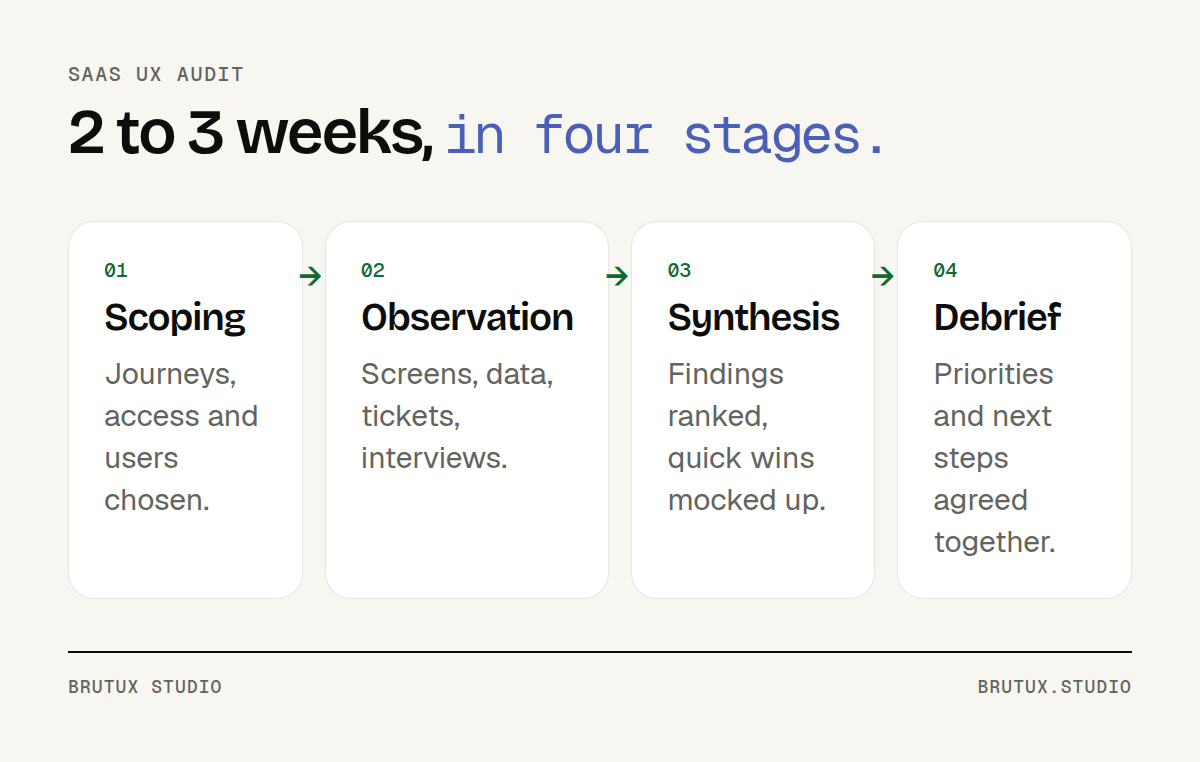 Scoping, observation, synthesis, debrief: the same process for every audit.
Scoping: choosing journeys and opening access
Everything starts with a conversation with your product team. We choose the journeys to audit, starting with those that matter most to your customers and your business. Three journeys studied properly beat a quick pass over the whole product.
Scoping also sets the starting question: why trials do not convert, why a customer team neglects the tool, why a given screen generates so many tickets. A precise question makes for a precise audit.
We then open the access we need: a test environment, analytics, the support tool. Finally, we identify the users, customers or colleagues, who are willing to give us some of their time.
Observation: documenting without solving yet
This is the longest stage. Screen review, data analysis, ticket sorting and interviews run in parallel. The rule is strict: we describe what actually happens, without proposing solutions yet.
That restraint avoids a classic trap: getting attached to a fix on day two, then only seeing the facts that support it. Findings stay open until the synthesis.
AI helps transcribe interviews and group hundreds of tickets by theme. It speeds up the sorting, but every finding is reread, checked on the screens and tied to a real observation.
Synthesis and debrief
Findings are grouped by theme, each illustrated with a screenshot and a user quote. They are then ranked, and the most cost-effective fixes are mocked up in Figma.
The audit ends with a debrief session with your team. We go through the priorities together, answer questions and agree on next steps: what you fix yourselves, and what deserves a larger workstream.
The mock-ups of the first fixes are handed over at that point, along with all the audit files. Your team can pick them up the very next day.
How should findings be ranked to decide quickly?
An audit easily surfaces several dozen problems. Without an order of priority, that list discourages more than it helps. Ranking is therefore the step that gives the audit its value.
Severity first, then strength of evidence
NN/g suggests rating the severity of a usability problem on three factors: frequency, impact and persistence. In other words: how many users run into it, how much it gets in their way, and whether they overcome it once or keep stumbling over it.
To these three criteria we add the strength of the evidence. A finding confirmed by two sources, for example a screen flagged in the expert review and mentioned in tickets, goes to the top of the action plan. An isolated finding remains a hypothesis to check.
Here is how that plays out on three typical findings:
| Finding | Sources that confirm it | Decision |
|---|---|---|
| “Pending” status understood in three ways | Tickets and interviews | High priority, quick fix |
| Weekly export to rework a table elsewhere | Analytics and interviews | High priority, major workstream |
| Ambiguous label on a rarely opened screen | Expert review only | Check before acting |
Impact and effort: the decision matrix
Each problem is then placed according to the effort needed to fix it and the expected impact on usage. This matrix turns a list of findings into an action plan that management and developers alike can follow.
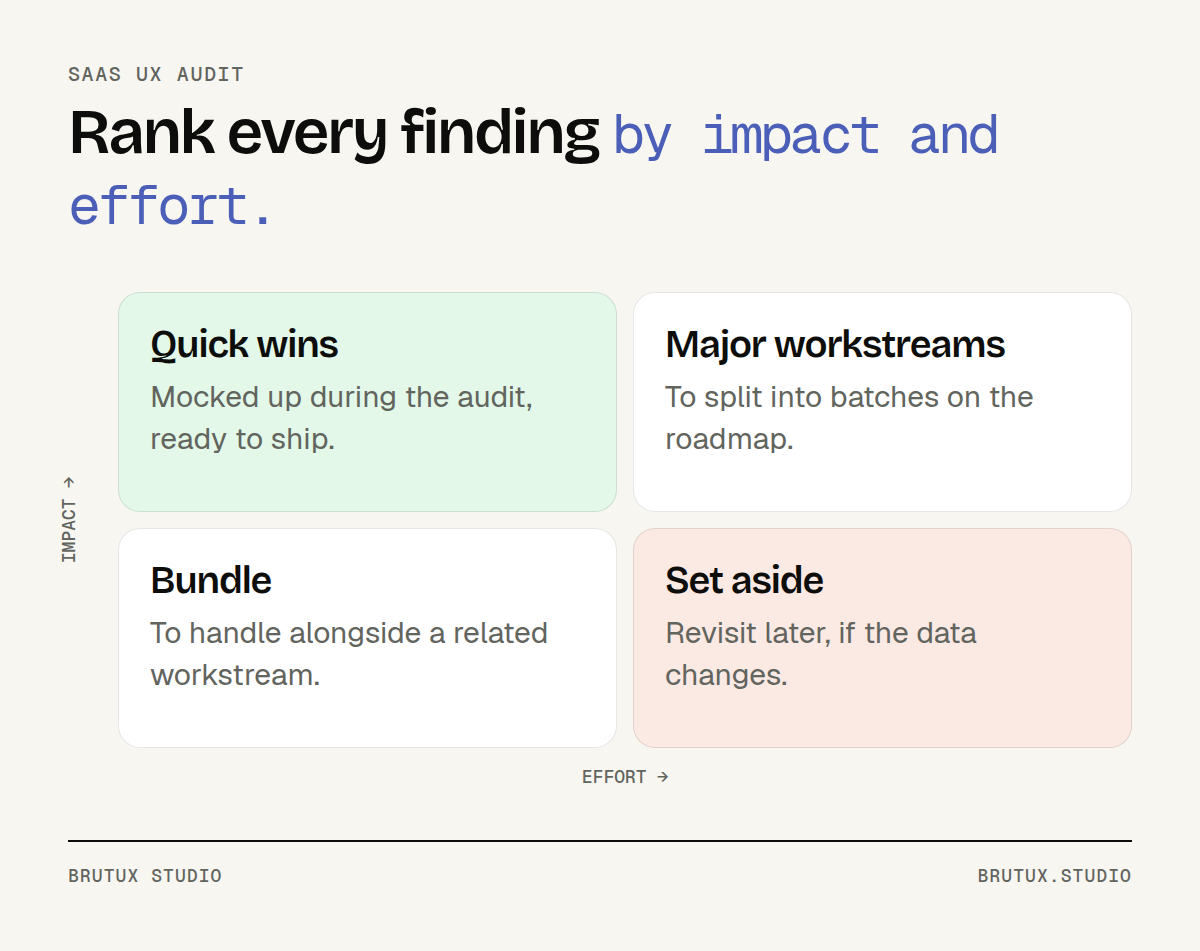 The impact / effort matrix turns the list of findings into an action plan.
Quick wins, low effort and high impact, are mocked up during the audit. Your team can ship them right away, without waiting for a decision on the rest.
Major workstreams go on the roadmap, split into batches. This is often where you decide whether a redesign is needed, or whether a few reworked journeys will do.
What do you receive at the end of the UX audit?
An audit is judged by what your team does with it the following week. The deliverables are therefore designed to be reused as they are, stored in your own tools.
The deliverables, one by one
At the end of the audit, your team has eight items:
- a map of the audited journeys, showing the steps where people hesitate or drop out;
- a log of friction points, screen by screen, each linked to a screenshot and its likely cause;
- a summary of the interviews: users’ words, workarounds and expectations;
- an annotated reading of analytics and tickets, with the events to track next;
- an accessibility and readability check on the journeys reviewed;
- a prioritised action plan, by impact and effort;
- quick wins mocked up in Figma, ready for your developers;
- the debrief session, to agree on next steps together.
The heart of the deliverable is the action plan. It is deliberately short: a ranked list your team can start on straight away, rather than an exhaustive report nobody rereads.
What the audit does not deliver
An audit is not a redesign. It does not redraw the whole product and does not replace an RGAA conformance audit. It tells you where to act, in what order, and shows what the first fixes look like.
It often avoids an unnecessary redesign. A few reworked journeys and a consolidated design system are sometimes enough to put a product back on its feet.
If a larger workstream is needed, the audit becomes its brief. Our page on UX/UI design and design systems explains what comes next: journeys, screens and a component library.
How do you prepare the audit and choose a partner?
An audit moves faster when your team has prepared the ground. Choosing a partner comes down to a few simple questions.
Three things should be ready before scoping:
- access: test environment, analytics, support tool;
- one or two product contacts, available for questions;
- a list of customers or colleagues willing to talk for half an hour.
To compare proposals, ask which sources will be cross-checked: an expert review alone, or also data, tickets and interviews. Ask who runs the audit from scoping to debrief, and whether the deliverable includes mock-ups or only a report.
Be wary of an offer that promises a full diagnosis without speaking to a single user. It will produce useful hypotheses, but not a diagnosis. Ask what happens afterwards too: can the same partner design and build the fixes?
At Brutux Studio, a senior designer runs the audit from start to finish, and the studio can take on what follows in design, design system and development. Our way of working describes that sequence.
Proximity matters for interviews and the debrief. From Thonon-les-Bains, we work with Geneva teams, whose financial tools and service platforms are at the heart of our UX agency in Geneva, as well as with the young companies of the Lake Geneva region supported by our UX agency in Lausanne.
You now know what a SaaS UX audit analyses and what it should leave in your hands. To find out where to start with your product, book 30 minutes: we will look at your journeys and signals together.
Sources
- Nielsen Norman Group, Triangulation: Get Better Research Results by Using Multiple UX Methods: combining several methods to offset the limits of each.
- Nielsen Norman Group, 10 Usability Heuristics for User Interface Design: the ten heuristics, broad rules of thumb rather than specific guidelines.
- Nielsen Norman Group, How to Conduct a Heuristic Evaluation: three to five independent evaluators; evaluation does not replace user research.
- Nielsen Norman Group, 3 Uses for Analytics in User Experience Practice: analytics to flag potential problems, investigate them and triangulate.
- Nielsen Norman Group, Field Studies and Ethnographic Methods: observing participants in their own environment.
- Nielsen Norman Group, Why You Only Need to Test with 5 Users: five participants and several small tests for a qualitative study.
- Nielsen Norman Group, Severity Ratings for Usability Problems: severity combines frequency, impact and persistence.
- W3C, What’s New in WCAG 2.2: the accessibility Recommendation of October 2023.
- DINUM, RGAA: introduction to the method: 106 test criteria to assess conformance.