
AI in B2B SaaS creates value when it lightens a specific, frequent and measurable task, on the screen where the user already works. It destroys value when it takes the form of a generic assistant that nobody knows how to question. The right starting point is therefore not choosing a model, but choosing a task, a level of human oversight and a way to measure the result.
Over the past two years, many software vendors have added a chat bubble to their product. Users try it once, then forget about it. This article sets out a method to do better: spot the right use cases, decide who has the final say, prove the gain and take account of the GDPR, the Swiss Federal Act on Data Protection (FADP) and the EU AI Act.
Where does AI in B2B SaaS create value?
Your users do not open your software to discover AI. They open it to process cases, approve orders and keep track of deadlines. Useful AI shortens that work without adding a new step to learn.
Nielsen Norman Group observed this in user testing: narrowly scoped AI features are generally easier for new users to understand and adopt than open-ended tools. A feature that does one thing well beats an assistant that promises to do everything.
The four families of use cases that keep coming up
In the products we design, useful AI features almost always fall into four families:
- flag: highlight what needs attention, such as an approaching deadline, an anomaly or a blocked case;
- prepare: pre-fill an order, a reply or a reconciliation that the user only has to check;
- summarise: condense a customer history, a series of tickets or a fifty-page file;
- classify and extract: file attachments, read fields from a document, match two sources.
None of them is spectacular. That is what makes them pay off: they target actions repeated every week.
Free-form conversation is not on the list by default. It has its place when the user's question is genuinely unpredictable, for example a search across extensive documentation. Elsewhere, it shifts the effort onto the user, who has to phrase a request instead of clicking.
The right place: on the screen, not beside it
The same feature can succeed or fail depending on where it appears. A suggestion shown in the list the user is already looking at will be seen. The same suggestion tucked away in an "Assistant" menu will be ignored.
Take a screen for managing protective equipment, such as the one in EPItrack Manager, whose interface the studio designed. Non-compliant situations stand out there at a glance. A well-placed AI feature would go one step further: next to the employees on alert, a bulk order already prepared, with a button to approve it.
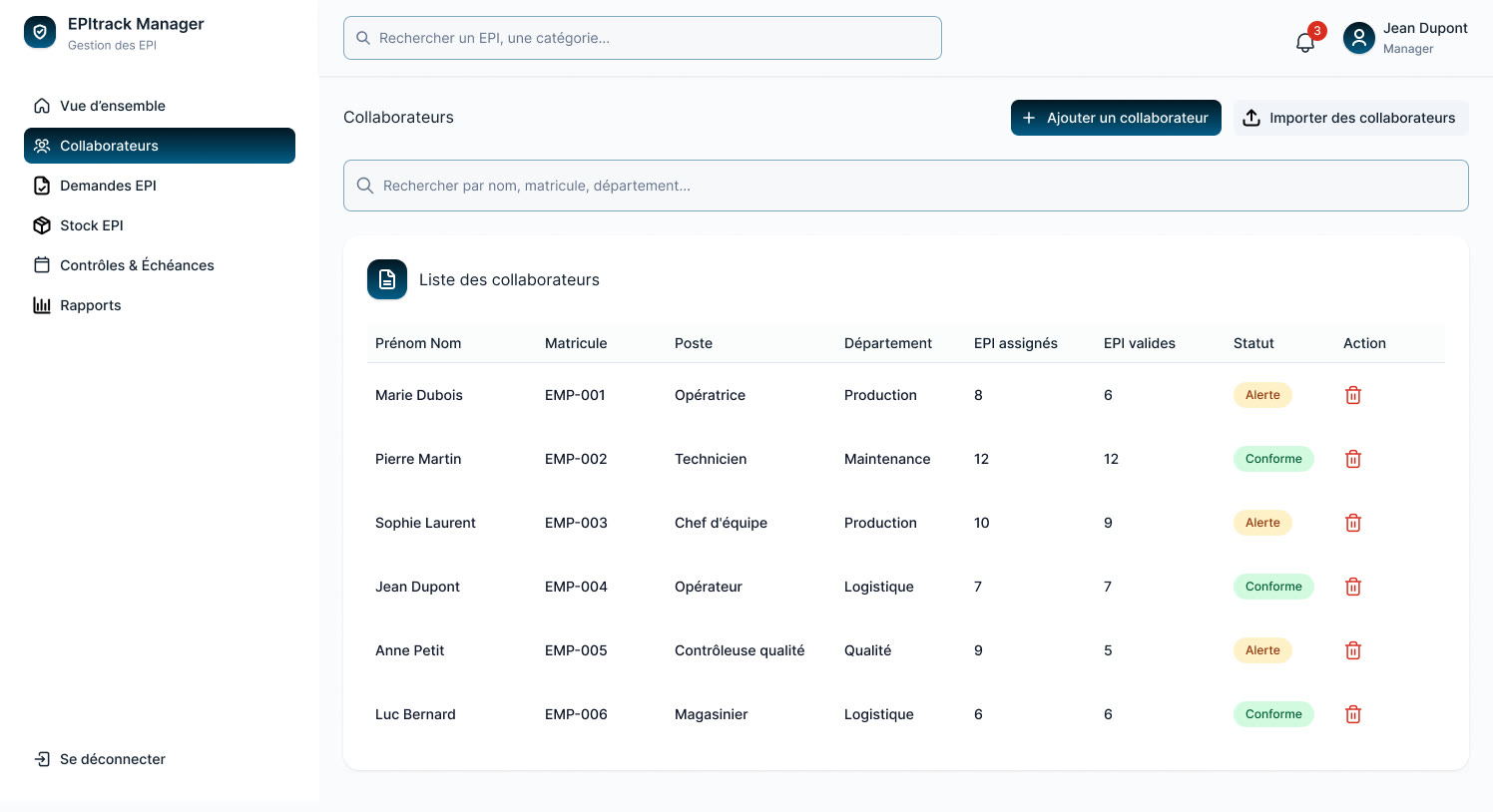 EPItrack Manager, UX/UI design by Brutux Studio: the place where an AI suggestion would be seen.
A cluttered screen leaves no readable space for a suggestion. If your users already get lost in the interface, start by reading the signs that a B2B SaaS redesign is needed: AI amplifies a product's clarity, it does not fix its mess.
How do you choose your first use cases?
Most vendors have too many ideas, not too few. The job is to keep two or three of them, based on criteria you can verify. We use three, then a simple grid to decide.
Three questions for every idea
Which task do your users repeat most often? Look in usage data, support tickets and interviews. A task done twice a month does not justify a project, even if it is tedious.
How long does it take today? Time it with a few real users, even roughly. Without that baseline, nobody will be able to say later whether AI has changed anything.
What does an error cost? An imperfect summary can be corrected in ten seconds. A wrong billing line or an incorrect compliance status exposes your customer. That cost determines the role you can give to AI.
A gain and risk matrix to decide
Place each idea on two axes: time saved and the cost of an error. The matrix below sums up the decision that follows.
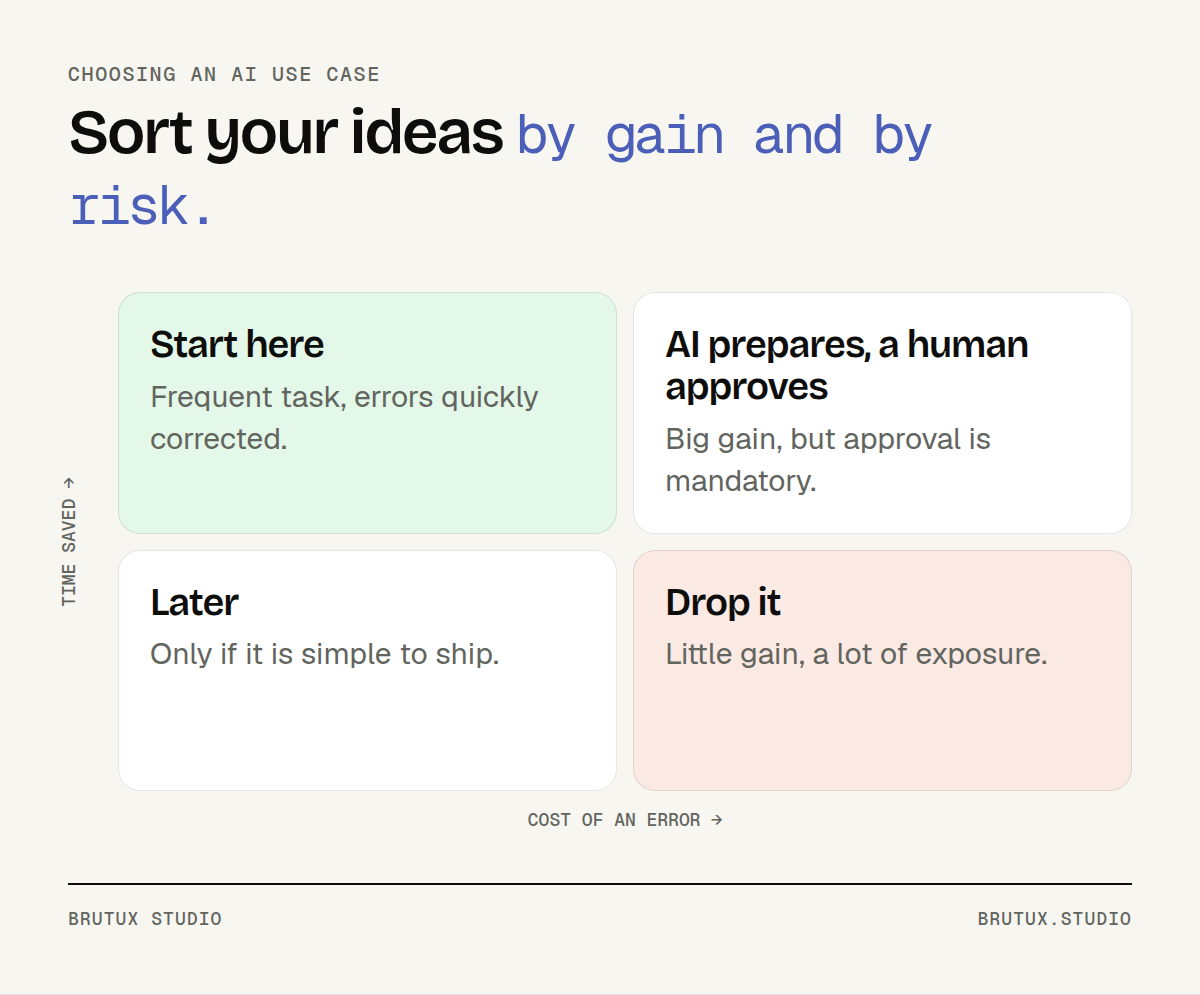 High gain and harmless errors: start there. High gain and costly errors: AI prepares, a human approves.
The top-left quadrant is your first project: a lot of time saved, errors with no serious consequences. The top-right quadrant is still worth pursuing, but it requires systematic human approval. The rest waits or comes off the list.
Two criteria rule out an idea, wherever it sits in the matrix. First, the data it needs does not exist, or is too scattered to use. Second, nobody on your side will be able to judge whether the AI's answer is right.
The NIST risk management framework formalises this sorting. Its "Map" function should provide enough context for an initial go/no-go decision before an AI system is designed or deployed. In other words, you are allowed to conclude that an idea is not worth it.
Who decides: the AI or the user?
In a B2B product, an AI error becomes your customer's error, then yours. The central question is therefore not "what can the model do?" but "who decides, when, and with what information in front of them?". This is what is known as keeping a human in the loop.
Three levels of autonomy
We distinguish three possible roles for an AI feature, to be chosen according to the cost of an error.
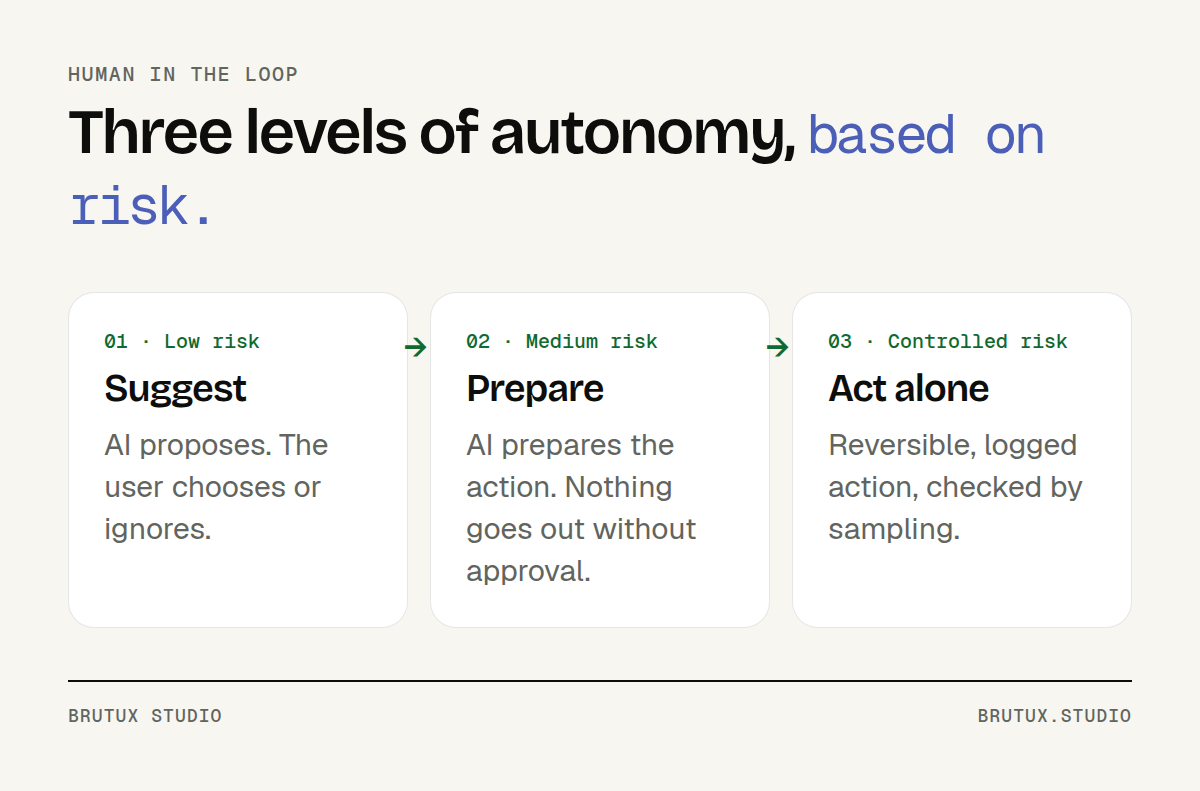 The more an error costs, the more control the user keeps.
Suggest. The AI proposes an option, and the user takes it or ignores it. This is the ideal level to start with: the risk is low and rejections teach you a great deal.
Prepare. The AI builds the complete action, but nothing goes out without an approval click. This level suits most high-gain tasks in business software.
Act alone. Keep this level for actions that are reversible, logged and checked by sampling. Filing attachments may lend itself to it. Sending something to the end customer rarely does.
Design the approval step, not just the model
Approval only makes sense if the user can judge what they are approving. Show the source material behind a summary. Visually distinguish what the AI produced from what the user entered. Make correcting as quick as accepting.
The opposite trap exists too. On our CRAFT method page, we cite an MIT study in which radiologists assisted by an AI tool performed worse than on their own, because they deferred to the machine precisely in the cases where it was unsure. Approving without looking is not human oversight.
That is why the interface should also flag uncertain cases, rather than presenting every proposal with the same confidence. And your users need to know, in concrete terms, when to be wary of a suggestion.
How do you measure the gain from an AI feature?
An AI feature can shine in a demo and disappoint in production. The only safeguard is to define the measurement before building, then track it once the feature is live.
Before you build: a case set and a baseline
Gather around fifty real cases, including the difficult ones. For each, record the correct answer and the time it currently takes to produce it. This case set lets you compare several models on your own data.
Also set the threshold above which the feature is worthwhile. For example: a proposal judged correct without edits in a large majority of cases, and a clearly reduced processing time. This threshold is agreed with the business teams, not by the engineering team alone.
NIST recommends testing AI systems before deployment, then regularly while in operation. Models change, and so does your data: keeping the case set lets you rerun the test with every change.
After release: three metrics
Once the feature has shipped, track at least:
- processing time for the task, compared with the baseline;
- acceptance rate of suggestions: accepted as is, edited or rejected;
- after-the-fact corrections: errors spotted after approval, by the user or by their customer.
A very low acceptance rate points to a feature that is useless or badly placed. A rate close to 100% combined with after-the-fact corrections points to a different problem: your users approve without reading. The two figures should be read together.
Roll out to a few volunteer accounts first. Their feedback is worth more than a month of internal testing.
How do you integrate AI into a SaaS product while limiting legal risk?
For a vendor selling in France, Switzerland and the European Union, three pieces of legislation come into play. What follows is not legal advice, but the points to raise from the design stage onwards.
GDPR: impact assessment and data minimisation
France's data protection authority, the CNIL, points out that a data protection impact assessment (DPIA) is required when processing is likely to result in a high risk to people's rights and freedoms. Processing that meets at least two of the nine criteria set by the European Data Protection Board is presumed to be covered.
The same page clarifies a point that matters to vendors: when the provider only covers the development phase, the user acting as data controller must carry out its own DPIA for deployment. So agree with your customers who documents what.
The CNIL also recommends favouring the technique that uses as little personal data as possible. In practice: only send the model the fields the task needs, and pseudonymise whatever can be.
FADP: Swiss law already applies to AI
In Switzerland, the Federal Data Protection and Information Commissioner (FDPIC) states that the law in force since 1 September 2023 is directly applicable to AI-based data processing, without waiting for dedicated legislation.
The FDPIC expects manufacturers, providers and operators to be transparent about the purpose, functioning and data sources of their AI systems. It links this transparency to the right to object to automated processing or to require that a person review an automated individual decision. The "prepare" level from the previous section naturally meets this requirement.
For a vendor selling to customers in Geneva or Vaud, these questions come up early in the sales cycle. We address them from the outset with the teams behind our AI consulting in Geneva and in Lausanne.
AI Act: what already applies, and what is coming
The AI Act applies in stages. According to the European Commission's page on the regulation, the prohibitions and the AI literacy obligation have applied since 2 February 2025, and the obligations for providers of general-purpose AI models since 2 August 2025.
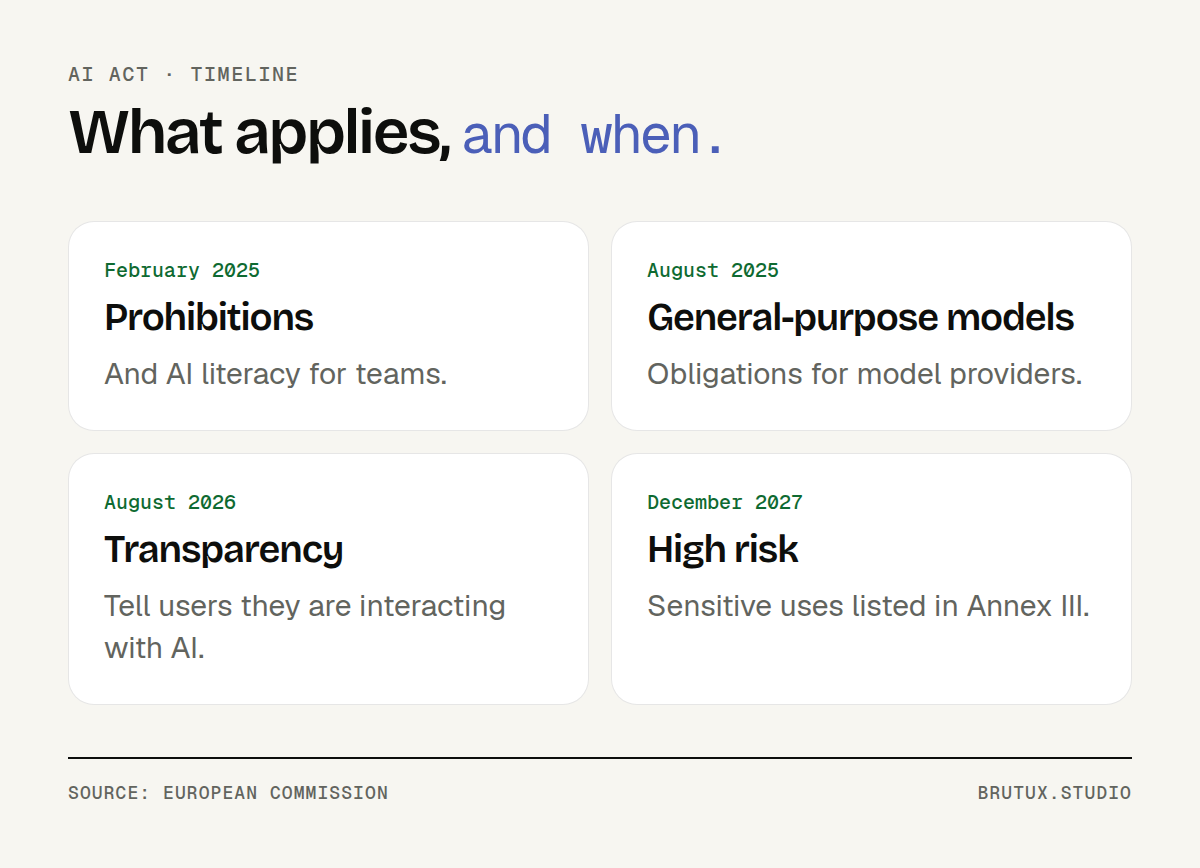 The AI Act timeline after the 2026 AI omnibus, according to the European Commission.
| Deadline | What applies | What it changes for a B2B SaaS product |
|---|---|---|
| 2 February 2025 | Prohibited practices, AI literacy | Train the people who use or operate your AI features |
| 2 August 2026 | Article 50 transparency | Clearly disclose an interaction with AI |
| 2 December 2027 | High risk, Annex III | Only if your use falls within the sensitive areas listed |
On AI literacy, the Commission specifies that Article 4 also covers persons operating or using an AI system on behalf of a provider or deployer, including contractors or customers. Since the AI omnibus, no precise "sufficient" level is imposed, but the obligation remains.
Since 2 August 2026, Article 50 requires people to be informed that they are interacting with an AI system, clearly and from the first interaction, unless this is obvious. A conversational assistant is directly affected. For a suggestion built into the screen, disclosing its nature remains good design practice, and a mark of trust.
For high-risk systems, the AI omnibus adopted in 2026 (Regulation (EU) 2026/1744) pushed back the deadline: the Commission gives 2 December 2027 for the sensitive uses in Annex III, and 2 August 2028 for AI embedded in regulated products. Most features of a business management SaaS product do not fall into these categories, but check on a case-by-case basis with a lawyer: these dates are those known in October 2026.
Which mistakes should you avoid, and where should you start?
Failed projects tend to look alike. They rarely stumble on the technology; more often on the choice of task, the measurement or user trust.
The most common mistakes
- Announcing AI before making it useful: an "AI-powered" badge is no substitute for a visible gain.
- Choosing the model before the task: compare models on your cases, not on a public leaderboard.
- Launching without a baseline: you will never be able to prove the gain to your customers or your leadership.
- Granting too much autonomy too soon: start by suggesting, and move up a level when the figures justify it.
- Sending customer data to a third-party service without analysis: contracts, hosting and minimisation are decided before, not after.
- Forgetting usage costs: one model call per screen displayed can cost more than the value it creates.
A less obvious mistake: leaving AI to the development team alone. The gains play out in your customers' day-to-day work, so product, support and sales should all help choose the use cases.
A first project in four stages
For a first step, keep the scope narrow: one task, one screen, one measurement before and after. We structure this work around the phases of the CRAFT method: Cartograph to understand the context, Review to diagnose processes and data, Architect to design the human-AI system, Frame to prioritise and plan, then Transform to deploy and monitor over time.
Each phase produces a written deliverable: a strategy report, a data and process maturity matrix, a functional specification, a twelve-month roadmap and a managed deployment plan. These documents remain the vendor's property, whether the integration is then carried out in-house or with us.
The first project fits into four stages: observe the task, settle the case set, prototype the screen, ship to a few accounts and then widen the rollout.
A well-chosen, well-placed and measured feature is worth more than a general-purpose assistant that nobody opens. If you want to know where AI would save your users time, our team for integrating AI into your software can review your product with you.
Sources
- Nielsen Norman Group, Scope in Generative AI Features: adoption of narrowly scoped features.
- NIST, AI RMF Core: go/no-go decision, testing before and after deployment.
- CNIL, IA : réaliser une analyse d'impact si nécessaire (in French): when a DPIA is required.
- CNIL, Recommandations sur le développement des systèmes d'IA (in French): data minimisation.
- FDPIC, La loi actuelle est directement applicable à l'IA (in French): FADP, transparency, human review.
- European Commission, AI Act: application timeline.
- European Commission, AI Literacy, Questions & Answers: Article 4.
- European Commission, Transparency obligations under Article 50: Article 50.