B2B SaaS vendors
Your competitors are announcing copilots and customers raise the question in meetings. You need an AI feature that strengthens your product and your differentiation, not a trade-show demo.
Our AI integration service adds features to your SaaS or business application that prepare the user’s work, right on the screen they are already using. Design, prototyping, evaluation and development run together, and the way results will be judged is settled before the first line of code.
This service covers the whole journey from an idea to a feature people actually use: choosing the task to assist, designing the interface, selecting the model, connecting your data, testing on real cases, then shipping to production and monitoring. We work on your existing codebase, alongside your engineering team if you have one, or end to end.
The most common trap is bolting on a generic chat assistant and waiting for users to guess what to ask it. Other mistakes come up often too: a model chosen before the task is defined, no baseline for judging answer quality, customer data sent to a third-party service without prior review, or a feature acting on its own where a human sign-off was called for.
AI integration pays off first for B2B SaaS vendors looking to enrich their product, then for companies running in-house business software where teams lose time on repetitive work: filing documents, preparing orders, writing up meeting notes. It assumes a product already in use, with users we can observe and talk to.
Products already in use, and teams who want to ship an AI feature their customers genuinely use.
Your competitors are announcing copilots and customers raise the question in meetings. You need an AI feature that strengthens your product and your differentiation, not a trade-show demo.
Your in-house tool, custom ERP or extranet is full of repetitive work: data entry, filing, drafting. AI can prepare it, provided it respects your access rights and your processes.
The product is finding its users and AI looks like the logical next step. We help you choose the feature that serves the core of your value proposition, measure it, then ship it.
Your developers know your stack well, less so how to evaluate large language models or design assisted interfaces. We work alongside them, directly in your codebase.
Every feature starts from a specific task, observed among your users.
The interface flags what needs attention first and offers the next action, already prepared, so the user only has to check and confirm it.
A customer history, a run of tickets or a technical file summarised on demand, with links back to the source material for checking.
Sorting attachments, extracting information from forms, matching documents: the low-value manual handling taken off your team’s plate.
Human approval for sensitive actions, a log of accepted and rejected suggestions, and written rules on which data is passed to the model.
An AI integration is judged on what it leaves behind in your product and your team.
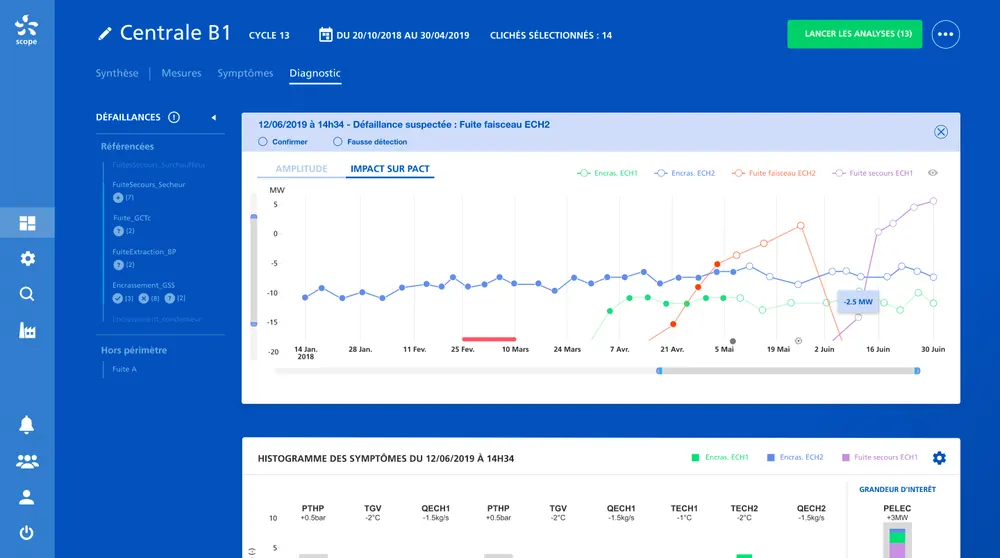
Integrating AI starts with making its outputs usable by the person who decides. For Metroscope and EDF, Victor Michel, the studio’s founder, worked through confidence intervals and false positives with the data scientists, then designed an alert system with recommended actions, prototyped on real data and tested with plant teams. That is the standard we aim for in your screens.
An integration proves itself on measurements, not on a slick demo.
Interviews and usage analysis: which operation recurs most, how long it takes, what an error would cost.
A set of representative cases and quality criteria fixed before development, so before and after can be compared.
Mock-ups of the screen concerned and first model trials: where the suggestion sits, how much control the user keeps.
Integration into your codebase, gradual roll-out to production, then tracking of acceptance rates and user feedback.
Chatbot, copilot, agent, RAG: the vocabulary changes fast, good practice much less so.
A chatbot waits to be asked a question. A copilot steps in on the working screen and suggests the next action. An AI agent chains several steps and acts inside your systems. The more autonomy you grant, the stricter the framework must be: limited permissions, human sign-off, traceability. In a B2B SaaS, the in-context copilot often strikes the best balance, because users keep the decision while saving the preparation time.
Retrieval-augmented generation, or RAG, lets a model answer from your own documents: procedures, contracts, technical sheets, tickets. It is one of the most requested uses, and one of the trickiest. Quality depends on how documents are split and kept up to date; security depends on respecting existing access rights. Every answer should cite its sources so users can check them in one click.
A successful demo proves nothing. Before writing code, we assemble a set of real cases, hard ones included, and agree what counts as a good answer. That protocol is used to compare models, catch regressions after every prompt or provider change, and decide with full knowledge whether the feature can be opened to all of your customers. The same test set keeps serving long after launch.
Every call to a language model has a cost and a response time. A feature used all day long can eat into a SaaS margin if it was not designed with that in mind. Using a lighter model for simple tasks, keeping the most powerful ones for complex cases, avoiding needless calls: these decisions are made at design time, not after the provider’s first invoice.
Users should know when content was produced by AI, understand what a suggestion is based on and be able to correct it easily. That is good interface practice, and it is also the direction the EU AI Act takes on transparency. We design these elements into the mock-ups from the start: a clear label, links to sources, an undo option, one-gesture feedback.
All three can ship an artificial intelligence feature; they do not start from the same place.
| Criterion | Brutux Studio | AI agency | Integrator or IT services firm |
|---|---|---|---|
| Starting point | The user’s task, observed first-hand | An AI use case or a platform | A technical specification |
| Interface design | Mock-ups and user testing included | Often a chat assistant | As per the specification |
| Quality evaluation | Test set fixed before any code | Varies from agency to agency | Standard acceptance testing |
| Model choice | Compared on your cases, no partnerships | Sometimes tied to a platform | Often tied to vendor partnerships |
| Working in your codebase | Yes, alongside your team | Often a separate module | Yes, fixed-price or time and materials |
| What comes next | Redesign, UX and design system available | Focused on AI | Maintenance and infrastructure |
AI integration: answers to the questions we are asked.
None by default. The choice depends on the task, the quality required, the running cost and your hosting constraints. We compare several options on your own test cases before recommending the one that fits.
Rarely. A well-targeted AI feature slots into an existing screen. Sometimes, though, a screen is too cluttered to host a readable suggestion; in that case we recommend simplifying it first.
By setting its role according to the risk: suggest, prepare, or act unattended. Actions that commit the company go through human approval, and every suggestion is logged so drift is spotted quickly.
Only if you agree, and within a defined framework: a suitable contract, minimised data, hosting chosen to meet your obligations under the GDPR or the Swiss FADP. Some integrations can run without passing on any personal data at all.
Start from the tasks your customers repeat in the product, not from what models can do. Rank them by value to the user, technical difficulty and risk of error. Begin with a preparation or summarising feature that is easy to check, before considering agents that act alone. Every step needs its indicator: acceptance rate, time saved, retention of the accounts that use it.
Four things. Does the studio design the interface as carefully as the model call? Does it propose an evaluation protocol before development? Can it work in your codebase, with your team? Can it show products shipped and used in production? Be wary of dazzling demos with no measurement, and of offers that impose a model before looking at the task.
Yes, when the task lends itself to it and the scope is clear. We define the permitted actions, the human sign-off points and the logging before we build. In most products we start with a copilot that prepares the action, then widen its autonomy as quality is demonstrated.
It is a technique that lets a model answer from your documents rather than from its own memory alone. It makes sense if your users often look for information in a document base, a history or a contract library. Otherwise a simpler integration does the job, and costs less to maintain.
Sometimes, yes. To connect two tools or trigger a simple task, an automation platform does the job very well, and we will tell you so. Integrating into your software makes sense when the AI has to appear on your users’ screens, respect your access rights and become part of your product.
30 minutes to talk about your project, in Thonon or by video call. I’ll tell you honestly what will make the difference.
Book 30 minutes ↗