
A SaaS wireframe is a raw version of a screen, with no colours or polish, used to settle the structure before investing in design and development. Starting with this raw version lets you test journeys with real users while a mistake still costs almost nothing to fix. Today, the raw version is often a quick prototype built with AI, but the principle is the same: validate the structure before refining the look.
Many SaaS projects skip this step to show something attractive quickly. The result arrives sooner, and so do the problems, but at the point where they cost the most. Here is why the raw stage saves time, what to settle there, how to test it and what AI has changed.
Why start a SaaS with a raw version rather than the final interface?
A final interface answers two questions at once: is this the right screen, and does it look good? The answers get mixed up. In meetings, people discuss a shade of blue or an icon when the real question is the order of information or a step too many.
The raw version removes the second question. Only the structure remains: what users see first, what they can do, where they go next. That is where the adoption of business software is won or lost.
The raw version is for deciding, not presenting
A wireframe is not a deliverable to show the board. It is a working tool for comparing two or three layouts of the same screen and discarding the weaker ones fast.
The Nielsen Norman Group notes that designers feel less attached to a low-fidelity prototype, and that users feel freer to criticise it (Nielsen Norman Group). Both effects matter.
A team that is attached to its screen defends its solution instead of listening. A user intimidated by a polished interface keeps their comments to themselves.
Stakeholders react the same way. In front of a raw version, they understand the work is not finished. In front of a polished mock-up, they often believe all that is left is to build it.
What a mistake costs, depending on when you find it
The same Nielsen Norman Group article points out that reworking a product after launch costs far more than throwing away a prototype (Nielsen Norman Group). On a sketch, moving a block takes a minute.
In software in production, the same move affects the code, the tests, the documentation and users’ habits.
The UK government’s service manual asks teams to prototype in order to explore, share and test different designs “before you commit to building anything” (GOV.UK Service Manual). The Government of Québec sets the same rule: a phase dedicated to testing assumptions, with solutions based on observation and evidence rather than assumptions (Gouvernement du Québec).
For a SaaS company, the stakes are the same. A badly structured feature generates tickets, workarounds and exports to Excel for years.
An extra hour spent on the raw version often saves weeks of rework.
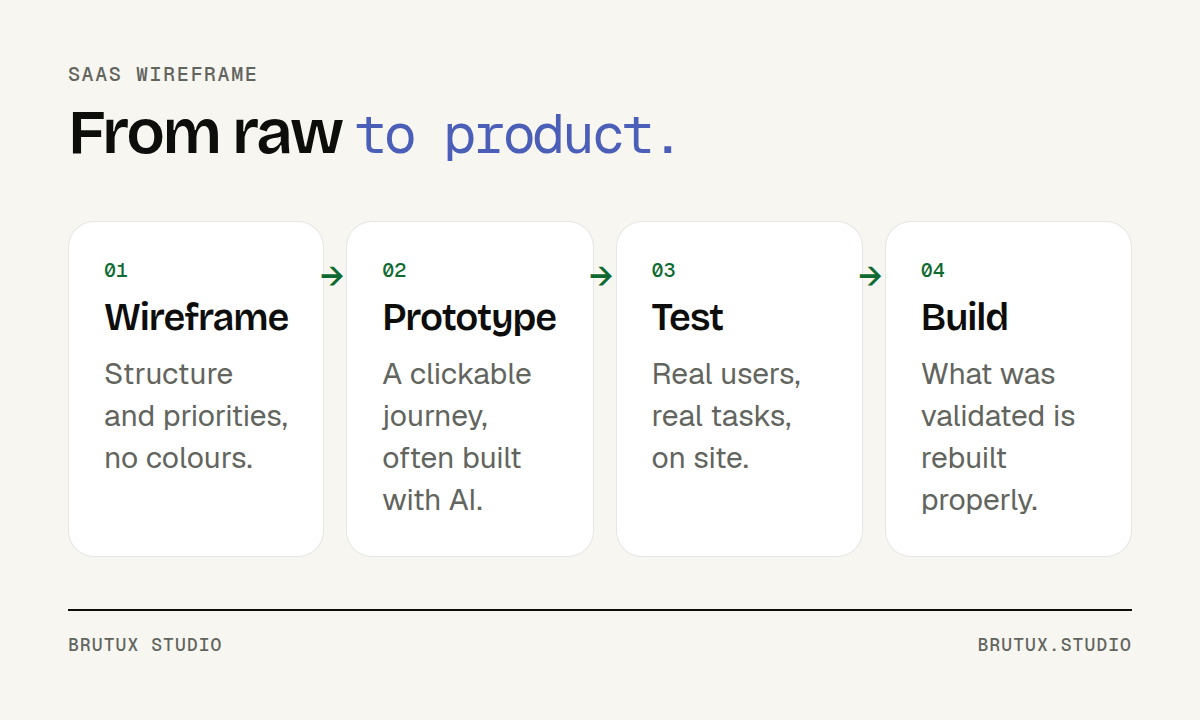 From raw to product: the structure is validated before design and code.
Wireframe, mock-up, prototype: what is the difference for a B2B SaaS?
The three terms are often used interchangeably. Yet they describe three levels of detail that answer different questions.
The Nielsen Norman Group suggests judging a prototype’s fidelity on three dimensions: interactivity, visuals, and content (Nielsen Norman Group). A prototype can be rough on one and precise on another. This grid helps you pick the right level for each question.
| Level | What it shows | The question it answers |
|---|---|---|
| Wireframe | Structure, blocks, priorities | Is this the right screen, in the right order? |
| Mock-up | The final look, static | Is it readable and on brand? |
| Prototype | A journey you can click through | Will users complete their task? |
The wireframe: structure and priorities
The wireframe answers the question of order. What appears at the top of a dashboard? Which columns does a list show?
It also decides between actions: which one is highlighted, which one is tucked into a menu, which one disappears.
On MSC’s B2B dashboard, Victor Michel, founder of the studio, first laid out a zoning, then wireframes based on what observing customers at work had shown. Every block of information had to match a use seen in the field, not an idea born in a meeting.
The mock-up: the look, once the structure is validated
The mock-up adds colours, typography, icons and visual states. It comes once the structure is stable, so you do not dress up a screen that is still going to change.
It is also the moment to check contrast and text size, so the screen stays readable on an office monitor as well as in daylight.
This is where the design system takes over: reusable components spare you from redrawing every button and table. Our article on the SaaS design system explains when to build one.
The prototype: what you test with real users
The prototype links screens together so they can be clicked through like the final product. It can stay rough visually, as long as the journey is realistic.
For Invest Easy, Swissquote’s robo-advisor, Victor Michel took several scenarios through low-fidelity wireframes, tested in quick guerrilla sessions, before moving to high-fidelity mock-ups. Testing on sketches made it possible to drop an idea without regret.
How has AI changed the raw stage?
Until recently, the raw version was drawn by hand or in a mock-up tool, screen by screen. AI tools now make it possible to produce a clickable prototype quickly from a description or a sketch.
At the studio, this has become the main way to iterate: rather than series of static wireframes, we quickly build a prototype people can try, then fix it. The principle of the raw stage is intact. Only the tool has changed.
A testable prototype, sooner
The Nielsen Norman Group evaluated several families of tools: mock-up generators, tools that produce interactive prototypes in code, and conversational assistants (Nielsen Norman Group). Its conclusions are clear about the useful cases: exploring directions early on, producing proofs of concept, and quickly turning a mock-up into a testable prototype.
For a B2B SaaS, this gain in speed changes the pace.
You can put two layouts of a screen in front of real users in the same week, instead of picking one on instinct because the second would take too long to draw.
What AI tools still miss
The same study sums up the results in one phrase: good from afar, but far from good (Nielsen Norman Group). Even the best outputs missed issues of spacing, grouping, hierarchy and contrast. Without precise visual guidance, the styling is generic and interchangeable.
More serious for business software, a tool can misread the need: in the study, a vague request for a “profile page” was understood as a social media profile, with secondary information first. The tool follows an instruction well; it does not know what matters to your users.
That is why a raw version produced with AI must be steered by someone who knows the business and its users. The request is precise, references are provided, and every generated screen is reviewed critically before it is shown.
A prototype is disposable by default
A prototype built with AI can look like a finished product. That is a trap. The UK service manual reminds teams that prototype code does not need to meet production standards, and that it should not be copied as it is into the product (GOV.UK Service Manual).
The same guidance recommends making several prototypes and discarding those that do not test well. What has been validated is then rebuilt properly, with architecture, tests and data handling worthy of software in production.
What should you settle at the raw stage?
The raw version is only useful if it leads to decisions. Here are the topics to settle before moving to the mock-up, in the order in which they weigh on adoption.
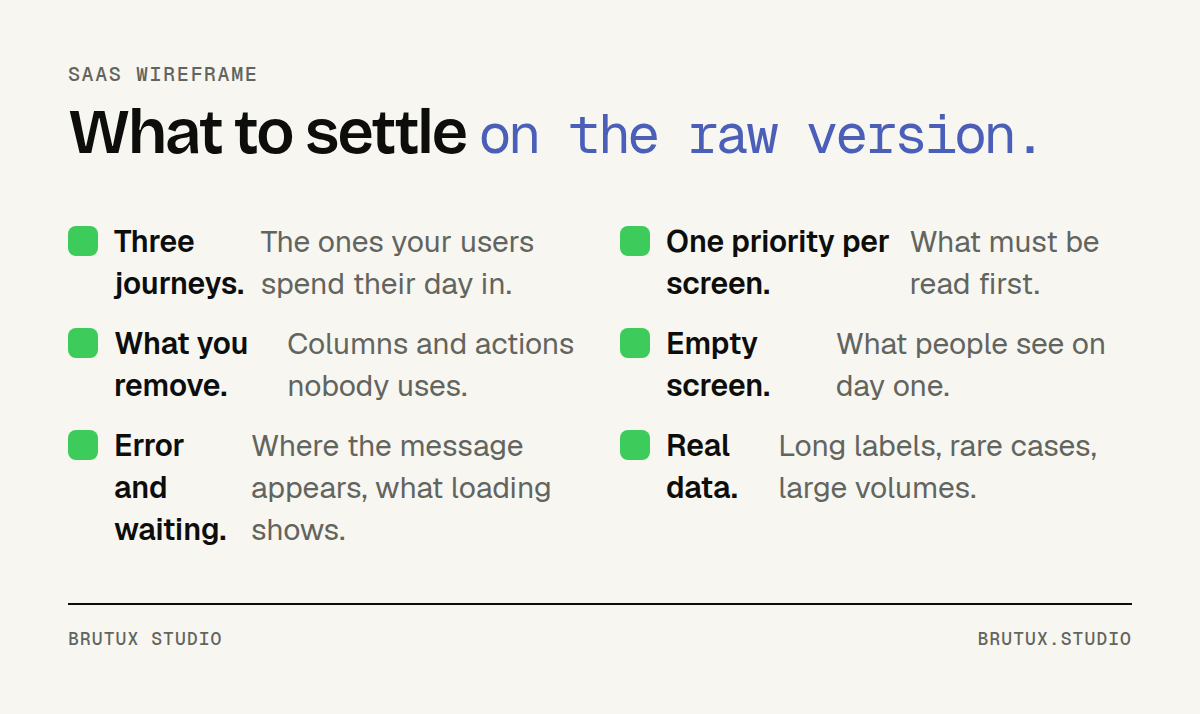 To settle on the raw version, before refining the look.
The three journeys that really matter
A SaaS has dozens of screens, but its users spend most of their time in three or four journeys. The raw version focuses on them: creating a file, approving a request, finding a piece of information, depending on your business.
To choose them, start from what your users do every day, not from the list of planned features.
The other screens can wait. Drawing them all at the same level of detail dilutes attention and delays the moment you test what matters.
The information hierarchy
On each screen, only one piece of information should be read first. On a dashboard, it is often whatever needs action today. On a list, it is the columns used to make decisions, not every column the database contains.
The raw stage is the right time to remove things. A column deleted on a wireframe costs nothing. The same column removed from a product in service triggers requests from customers used to seeing it.
The forgotten states: empty, error, waiting
Mock-ups almost always show the ideal screen, full of clean data. Reality is different: on day one, everything is empty; some actions fail; some processes take time.
Planning these states on the raw version avoids improvising them during development.
An empty screen that explains what to do, an error message in the right place, a clear loading indicator: these are often what makes the difference day to day. Our article on the SaaS UX audit shows how much they weigh in an existing product.
How do you test a SaaS wireframe without spending weeks on it?
Testing the raw version needs neither a lab nor a panel of hundreds. Above all, it needs real users, real tasks and some rigour in how you watch.
The Nielsen Norman Group puts it plainly: test prototypes, clickable or static, low or high fidelity, to learn how to improve the design (Nielsen Norman Group). The level of polish matters less than regularity.
A few users, real tasks
Give a precise task taken from their work: “find customer X’s order and flag a delay”. Do not show the way. Watch where the person hesitates, goes back or looks for a button that does not exist.
Note what people do, not only what they say. A user who says everything is clear may have looked for the same button three times.
A few sessions are often enough to see the same blockers repeat. You fix them, then test again. A short cycle matters more than the number of people seen each time.
Test where the work happens
Business software is used in a noisy office, between two calls, on a shared screen or in a workshop. That is where it should be tested. For MSC’s dashboard, the high-fidelity prototype was tested on site, in working conditions, and those tests revealed which information had to be readable at a glance.
Data matters too. For Metroscope, the predictive maintenance AI for EDF’s power plants, prototypes were built on real plant data before being tested on site by technicians. A demo on fictitious data would have revealed nothing about the real density problems.
Finally, have the raw version reviewed by the people who carry the constraints. On the digitisation of court procedures for a Swiss public service, the wireframes were first reviewed by lawyers, responsible for compliance, then the prototypes were tested by the court clerks who would use the screens every day.
Mistakes to avoid
Four mistakes come up often:
- Polishing too early. A refined mock-up before the structure is validated locks in choices that have not been tested.
- Mistaking a prototype for a product. What works in a demo has neither the security, nor the robustness, nor the maintainability of software in production.
- Testing on fictitious data. Tidy names and round amounts hide labels that are too long, rare cases and overloaded screens.
- Showing the raw version without framing the discussion. Remind everyone at each session what is being questioned, the structure, so nobody debates a temporary colour.
A polished prototype has its place too, but later.
For EPItrack, a SaaS for managing personal protective equipment, the studio designed a high-fidelity interactive prototype that serves as a demo for prospects and investors, and as a working base for developers. That level of finish comes after the journeys have been validated, not before.
The raw stage is not one more step in the project. It is the one that makes the next ones shorter: the mock-up starts from a validated structure, development starts from a tested journey, and the first customers discover a product that fits their real work.
Our CRAFT method puts this validation before every major investment, and we apply it for companies in the region as well as in Geneva, where the studio designs B2B SaaS products.
Sources
- Nielsen Norman Group, UX Prototypes: Low Fidelity vs. High Fidelity: dimensions of fidelity, effects of rough prototypes on designers, users and stakeholders.
- Nielsen Norman Group, AI Prototyping: what AI prototyping tools do well and what they miss.
- GOV.UK Service Manual, Making prototypes: prototype before building, discard what does not test well, do not copy prototype code into production.
- Gouvernement du Québec, Démarche de conception de services numériques: prototypes from paper sketch to interactive mock-up, assumptions tested before development.