
Google AI Overviews mainly cost clicks to pages that answer a simple question, the ones whose answer fits in a paragraph. Pages where visitors come to act (request a quote, book, compare offers, read a professional’s opinion) hold up far better. To find out what is happening on your site, compare clicks and click-through rate page by page in Search Console, before and after 22 July 2026.
Since that date, AI Overviews have been shown in France. The first studies point to real declines, but they vary widely between sites and queries. Here is what the available figures say, which pages are affected, which ones stay useful, and a tracking method you can apply this week.
Do Google AI Overviews really reduce traffic?
Yes for some sites, much less for others. The answer depends less on your industry than on the kind of question your pages answer.
What the first French data shows
Google France announced the launch of AI Overviews and AI Mode in France on 22 July 2026. A month later, the SEO tool maker Ahrefs published a study of 963 French domains, based on aggregated Search Console data.
The study compares the 28 days before the launch with the 9 days after it. On the most exposed domains, those where more than 20% of queries show an AI Overview, click-through rate fell by 23.1%.
Across the whole panel, the median effect is more moderate: click-through rate down 5.7% and clicks down 8.8%. Health is the hardest-hit sector, with 22.2% of queries showing an overview and click-through rate down 20.4%.
The observation window is short, and the study says so. These figures show a direction, not a forecast for your own site.
What the US studies say
In the United States, where overviews have existed since 2024, the decline is better documented. The Pew Research Center tracked the browsing of 900 adults in March 2025.
When an AI summary appeared, users clicked a traditional result in 8% of visits, against 15% without a summary. They clicked a link inside the summary itself in only 1% of visits. And the browsing session ended on the results page in 26% of cases with a summary, against 16% without.
Over a longer period, Ahrefs published a measurement of 300,000 keywords in February 2026: the click-through rate of the top position was about 58% lower when an AI Overview was present. Its previous study, in April 2025, found 34.5%. The gap therefore widened between the two measurements.
Google’s position
Google disputes this reading. In an August 2025 post, Liz Reid, head of Google Search, states that total organic click volume to websites has been relatively stable year over year.
She adds that clicks are of higher quality, meaning users do not quickly come back to the results page. She also acknowledges that traffic is shifting: some sites gain, others lose, especially on questions where people want a quick answer.
The two findings are not incompatible. A stable total across the web can hide heavy losses for certain types of page. That is why you need to look at your pages one by one.
Which pages are losing clicks?
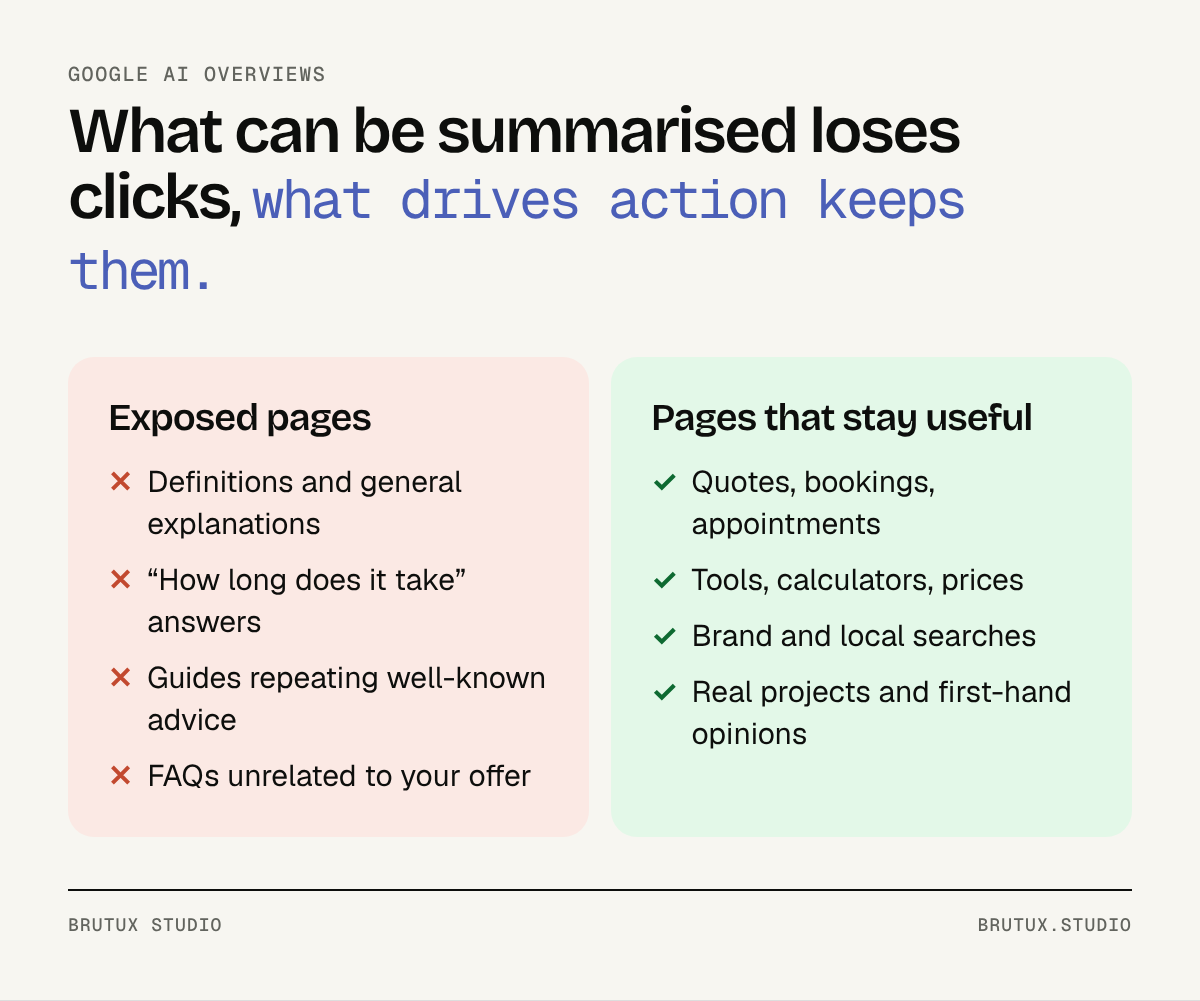
Exposed pages share one trait: the searcher can settle for the summary. They get what they were looking for without needing your site.
Answers that fit in a paragraph
The French Ahrefs study puts it this way: a query that a paragraph can answer is a query you are going to lose. Definitions, general explanations, lists of well-known tips and “how long does it take” or “what is” answers are on the front line.
The Pew study points the same way. Summaries appeared in 60% of searches containing a question word, and in 53% of searches of ten words or more, against 8% for one- or two-word searches.
For a business, these are often blog posts written to “drive traffic”: a glossary, a general guide, an FAQ page unrelated to the offer. They attracted visits that almost never turned into enquiries.
Losing those clicks looks bad on a dashboard. But if those visitors never contacted you, the real cost is lower than it seems.
Why ranking no longer protects you
According to Search Console Help, an AI Overview occupies a single position in the results, and all its links are given that same position. Traditional results are pushed further down the screen without their rank changing.
The consequence: your page can stay third, keep its impressions and lose part of its clicks. Rank tracking alone sees nothing. Click-through rate, page by page, is what reveals the effect.
The reverse also happens. A page cited in the overview can gain impressions without gaining visits, since very few users click the links in the summary.
 What can be summarised loses clicks, what drives action keeps them.
Which pages stay useful?
The same Ahrefs study observes that queries requiring a tool, an account, a price, a purchase or a person’s opinion hold up much better. Those pages offer value a summary cannot reproduce.
Pages where people come to act
A quote page, a booking or appointment page, or a calculator cannot be summarised. Visitors have to come to your site to get what they want.
The same goes for well-built service pages: what you do, for whom, where, with which steps and which references. A summary may mention your company, but the decision is made by reading the page.
For a small business, these are the pages that really matter. They are the ones to monitor first, before informational articles.
Brand and local searches
When someone types your company name, they are looking for your site, your phone number or your address. The studies cited give no figures for these searches, but a summary does not replace the site someone came looking for.
Local searches, such as “web agency Thonon” or “graphic designer Geneva”, go through the map and the business profile. The profile remains the first lever, as we explained in our article on Google AI Mode for a local business.
Near the border, one detail matters: the same company can appear in both French and Swiss results. Check the two countries separately in Search Console, as rollout and search habits are not necessarily the same.
First-hand experience and a person’s opinion
Google itself says, in its August 2025 post, that people are increasingly seeking out forums, videos, podcasts and first-hand perspectives. A page that tells the story of a real project, with its constraints and choices, offers what the summary lacks.
For a kitchen fitter, it is the difference between “how to choose a kitchen” and “three kitchens fitted in Évian, and what changed during the work”. The first page can be summarised. The second makes people want to see the photos.
Our AI visibility service starts from this observation: describe your company and your work precisely, so that generated answers cite you correctly and make people want to know more.
How do you track AI Overviews in Search Console?
Search Console does not tell you directly how many clicks an AI Overview cost you. But once you know its counting rules, you can read the effect quite precisely.
What the Performance report counts
According to Google’s page AI features and your website, traffic from AI Overviews and AI Mode is included in the Performance report, under the “Web” search type. It is mixed in with your usual figures.
Search Console Help spells out the rules. A click on an external link in an AI Overview or in AI Mode counts as a click. Impressions follow the standard rules. And a follow-up question asked in AI Mode counts as a new query.
Two pitfalls follow. First: a rise in impressions without a rise in clicks may come from citations in overviews, not from better rankings. Second: a stable average position says nothing about clicks, since the whole overview counts as a single position.
Finally, Search Labs experiments are not counted. What you see reflects the features open to the public.
The generative AI report
On 3 June 2026, Google introduced a performance report dedicated to generative AI. According to Search Console Help, it has been available to all websites since 31 August 2026.
It shows the impressions of your links in AI Overviews and AI Mode, by page, country, device and date. It gives neither clicks nor queries. It may also not appear if your site receives too few impressions in these features.
Its value is simple: it tells you which pages are cited. Cross-checked with the Performance report, it helps you spot pages that are often cited but rarely clicked.
A method in four comparisons
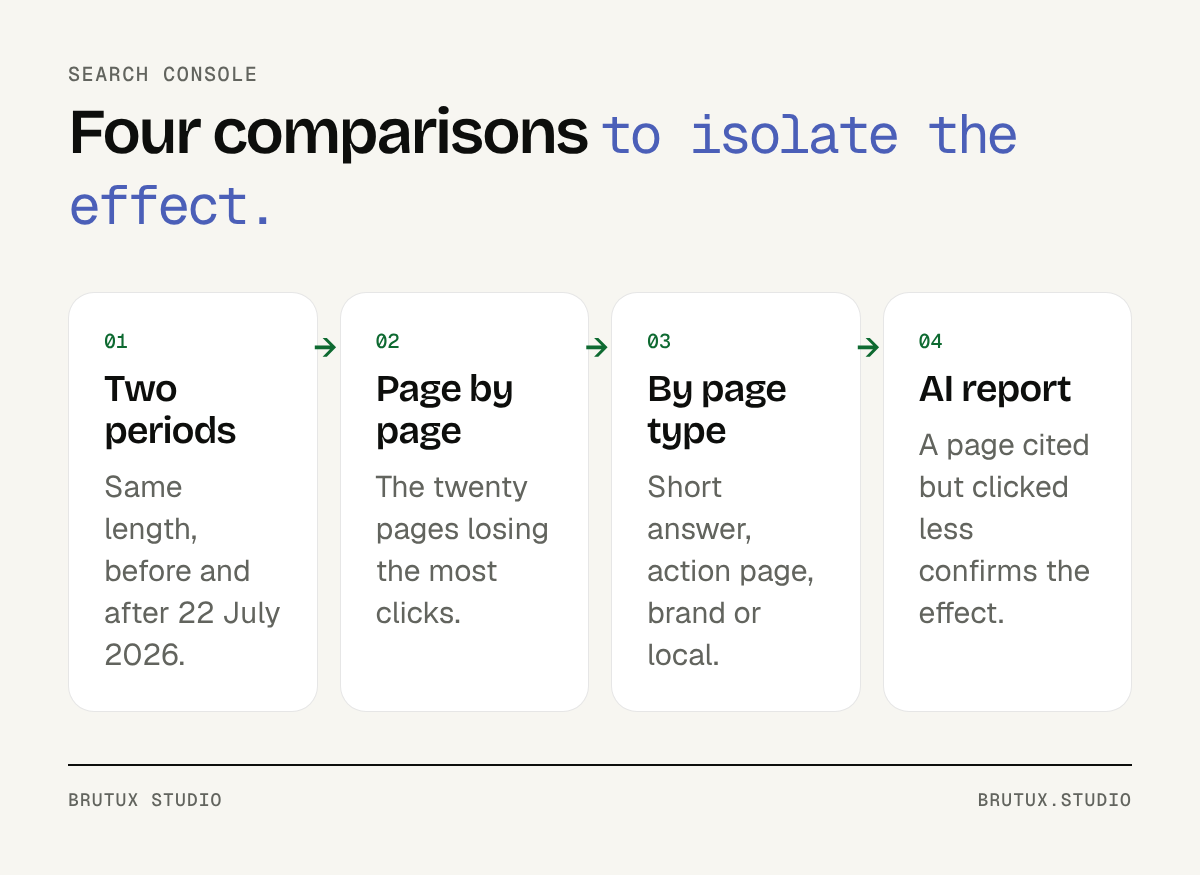
Here is a simple method that works on a small business website without paid tools:
- Two periods of the same length. For example the eight weeks before 22 July 2026 and the eight weeks from mid-August, to skip the transition. Also compare with the previous year if your business is seasonal.
- Page by page. In the Pages tab, sort by clicks lost. Note the twenty pages losing the most, with their impressions and click-through rate.
- By page type. Classify them: short answer, action page, brand or local page. If losses are concentrated on short answers, AI Overviews are the main suspect.
- With the generative AI report. Check whether the pages losing clicks appear there. A page that is cited and clicked less confirms the effect.
Keep a control group: your brand and contact pages. If they drop too, the cause probably lies elsewhere (season, outage, redesign, competition).
 Four comparisons to isolate the effect of AI Overviews.
What should you do with pages that lose clicks?
The reflex is to rewrite everything. It is almost never the right first decision.
Sort before you rewrite
For each page losing clicks, ask one question: did those visits lead to an enquiry? If the page never generated a contact, the loss is mostly statistical.
To check, Google’s page on AI features recommends tracking conversions and time on site in a tool such as Google Analytics. A form sent or a call made from the page tells you more than the number of visits.
Three decisions follow: keep the page as it is, enrich it so that it leads to your offer, or merge it into a more useful page. If you merge, the precautions in our checklist for a redesign without losing SEO apply: redirects, internal links, indexing follow-up.
Give people a reason to click
This is the product angle of the topic. A resilient page offers something the summary cannot deliver: a real example, photos of past work, a calculator, a template to download, a clear next step.
Put that element at the top of the page, and say so in the title and description. Someone reading the overview should understand they will find on your site what the summary lacks.
Also write for the decision, not the definition. “How to choose an SEO provider in Thonon” attracts a visitor looking for someone. “What is SEO” attracts a visitor looking for a definition, who will find it in the overview.
The groundwork remains that of search engine optimisation: healthy pages, well linked, that answer your customers’ real questions. We apply it from Thonon-les-Bains, as described on our web agency in Thonon-les-Bains page.
Do not block snippets by reflex
Google lets you limit what is reused from your pages, with the nosnippet, data-nosnippet and max-snippet controls, or by removing the page from the index. The AI features and your website page presents them as the available controls.
But these controls also shrink the snippet shown in traditional results. A page with no snippet attracts fewer clicks everywhere, not just in overviews. Keep them for specific cases, such as paid content or data you do not want reused.
For a small business looking for customers, being cited in the overview is generally better than being absent from it. Working on the reason to click beats closing the door.
Where to start? This week, run the four comparisons on your twenty most visited pages, and note which ones generated enquiries. The simplest step is to talk: in 30 minutes, we look at your Search Console together.
Sources
- Google France, Lancement des Aperçus IA et du Mode IA dans la Recherche Google en France (22 July 2026)
- Ahrefs, 1 mois d’AI Overviews en France et déjà -23,1 % de taux de clics : qui est concerné ? (17 August 2026)
- Ahrefs, Update: AI Overviews Reduce Clicks by 58% (4 February 2026)
- Pew Research Center, Google users are less likely to click on links when an AI summary appears in the results (22 July 2025)
- Google, AI in Search is driving more queries and higher quality clicks (6 August 2025)
- Google Search Central, AI features and your website
- Search Console Help, What are impressions, position, and clicks?
- Search Console Help, Generative AI performance report (Search)
- Google Search Central, Introducing Search Generative AI performance reports in Search Console (3 June 2026)