
Useful generative AI training teaches your teams to use the tool on their own work, to check what it produces and to know when not to use it. It starts from the real tasks of each role, relies on a short policy and is judged on use a few weeks later, not on satisfaction at the end of the session.
Many companies have already opened access to ChatGPT, Copilot or Mistral. Few have seen the work change in depth. Here is what the studies show, what training should include, how to organise it in an SME and how to tell whether it worked.
Why does so much generative AI training change nothing at work?
The scenario is common. The company buys licences, organises a one-hour presentation, then considers the matter closed.
Three months later, a handful of employees use it every day and the others have forgotten about it.
The problem almost never lies with the tool. It lies in how it was introduced: as a novelty to discover, rather than as a new way of doing specific tasks.
Handing out licences is not enough
Access without a method produces two opposite reactions. The most curious test it, find their own uses and progress on their own.
The others ask a vague question, get a generic answer and conclude that the tool is useless.
In between, everyone makes up their own rules. One person pastes a client contract into a consumer tool, another dares not put anything in it. Without a shared framework, the company discovers how the tool is used after the fact, often at the worst moment.
A tool demo is quickly forgotten
A lecture-style session impresses in the moment: a text drafted in ten seconds, a table summed up in one sentence.
But none of it resembles the next day’s work, with its documents, its jargon and its constraints. What remains are the gestures repeated on your own files. Training that leaves no time to practise on real cases is like a driving lesson given on a whiteboard.
What do studies say about generative AI at work?
Two widely cited field studies shed light on what to teach.
They do not say that generative AI saves everyone time, everywhere. They say where it helps, whom it helps, and where it misleads.
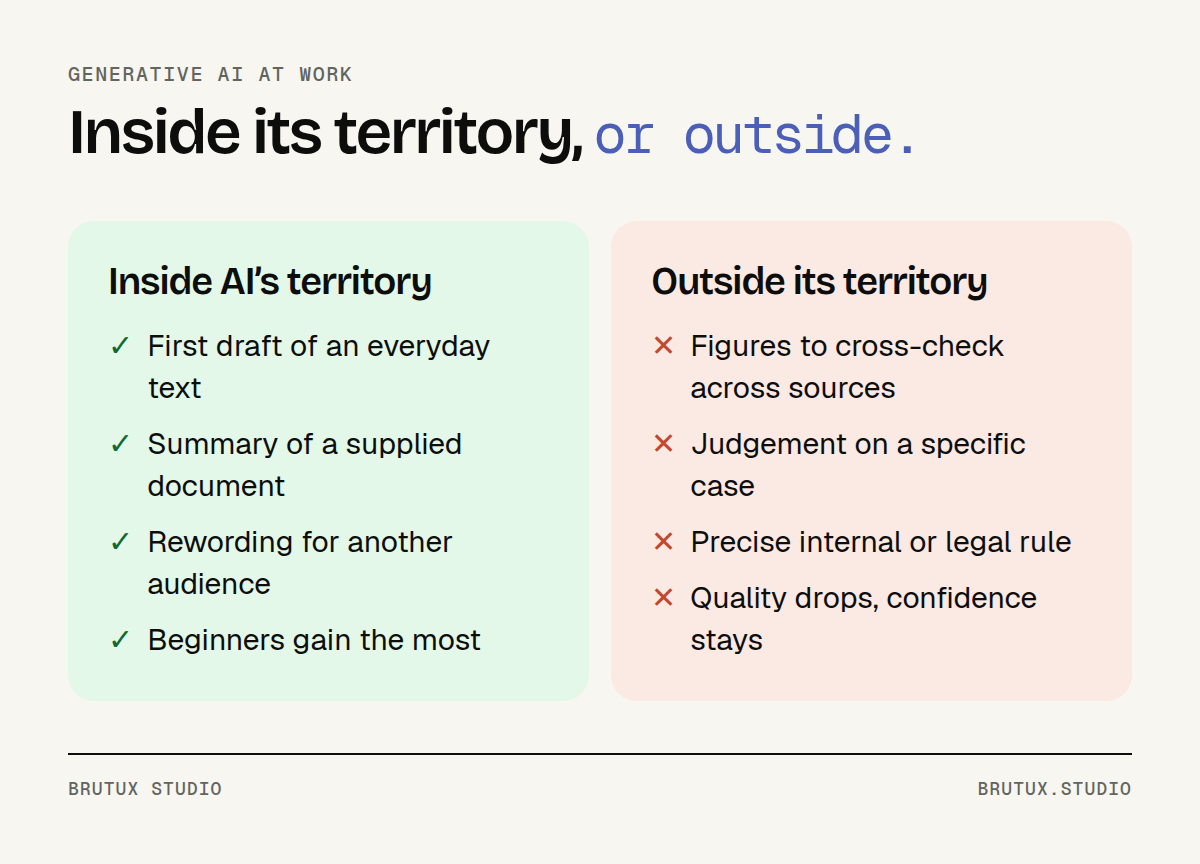 What generative AI does well, and where it lowers quality.
The gains are real on the right tasks
In a study run with Boston Consulting Group, more than 700 consultants worked with or without GPT-4 on creative and writing tasks. On the tasks within AI’s reach, using the tool improved performance by nearly 40% compared with those who did not use it (MIT Sloan).
The gains are not evenly spread. The lower-performing half of the consultants improved by 43%, against 17% for the higher-performing half (MIT Sloan).
Another study, in a customer support team, points the same way: the assistant raised the number of issues resolved per hour by 14% on average, and by 34% for novice or less skilled agents, with minimal impact on the most experienced (NBER). Generative AI passes some of the best people’s know-how on to those who are starting out.
For an SME, the lesson is twofold. New starters and colleagues less at ease with writing often have the most to gain: they are the ones to train first, not just the most curious.
Outside its territory, AI lowers quality
The same BCG study included a task chosen to lie beyond AI’s reach: recommending, in a memo to the CEO, which brand to invest in, based on figures and interview notes. On that task, the performance of consultants using the tool fell by 19 percentage points on average (MIT Sloan).
The researchers call this a jagged frontier.
From the outside, nothing distinguishes a task AI handles well from one it fails: the answer is just as fluent, just as well presented, just as convincing in both cases.
In an SME, these out-of-reach tasks look like choosing between several quotes, applying an internal rule to a specific case or a reply that commits the company. The tool produces confident text; the decision needs context it does not have.
Short training can reinforce overconfidence
The most useful detail of the study concerns a third group, who also received a brief overview of the tool. On the out-of-reach task, this group lost 24 points, against 13 for those who used the tool without the overview (MIT Sloan).
In other words, an introduction that mostly shows what the tool can do may raise confidence precisely where caution is needed. The French data protection authority, the CNIL, names this risk: automation bias, the tendency to trust the system more than it deserves (CNIL).
What should useful generative AI training include?
The studies set out the curriculum. Training should teach people to use the tool where it helps, to be suspicious of it where it misleads, and to protect what must not leave the company. The rest, including lists of “perfect prompts”, goes out of date within months.
Start from the real tasks of each role
A salesperson, an accountant and a support technician do not have the same needs. The first drafts proposals, the second checks entries, the third answers repetitive requests.
A generic exercise speaks to none of them.
Preparation therefore means gathering, with a few participants and their managers, the tasks that come back every week. The exercises are then built on those tasks, using real anonymised documents.
- Drafting: a first draft of an email, an offer, meeting notes.
- Summarising: condensing a long document, comparing two versions of a contract.
- Rewording: adapting a technical text for a client or a new starter.
- Searching: finding information in an approved internal knowledge base.
Learn to check as much as to ask
Phrasing a request is quickly learnt: give context, state the expected format, provide an example, break a long task into steps. Checking takes more practice, because the error does not show.
The CNIL recommends making users familiar with how these systems work and with their limits, always taking a critical view of what they produce and never reusing their output as it stands (CNIL). In a workshop, this means exercises where the answer contains a plausible error: an invented figure, a misquoted rule, an approximate name.
The level of review should match the stakes. An internal draft is reviewed quickly; a document sent to a client, a legal answer or a published figure is checked source by source.
One simple habit helps a great deal: ask the tool where each piece of information comes from, then check those sources yourself. When it cannot cite any, treat the answer as a hypothesis.
Say what you never hand to the tool
Every participant should leave knowing what they never paste into an assistant: personal data on clients or staff, information covered by a contract, strategic documents. The answer depends on the approved tool and how it is deployed, hence the value of spelling it out.
The workshops also show how to work without exposing that information: replacing names with roles, removing amounts, summarising a case rather than pasting the document. These habits take a few seconds once learnt.
It is also a question of liability. The CNIL points out that, as a rule, it is the organisation using the tool that bears legal responsibility when its staff misuse it (CNIL).
A one-page policy, given to everyone
The CNIL recommends governing use through internal policies or charters that clearly set out permitted and prohibited uses (CNIL). One page is enough, as long as it is concrete and known to all.
| Section | What it says | Example |
|---|---|---|
| Approved tools | Which ones, with which account | The assistant built into the company’s email |
| Prohibited data | What never leaves | Client files, salaries, ongoing contracts |
| Mandatory review | Who reviews what, and when | Any text sent outside the company |
| Questions | Whom to ask | The team’s AI champion |
We explain where this policy fits in a broader approach in our article on AI strategy for an SME. Training brings it to life: each rule is illustrated with a case taken from the participants’ own work.
How do you organise generative AI training in an SME?
In an SME, time is short and not everyone can be away on the same day. A four-stage programme works well: leadership first, then workshops by role, champions, and a follow-up.
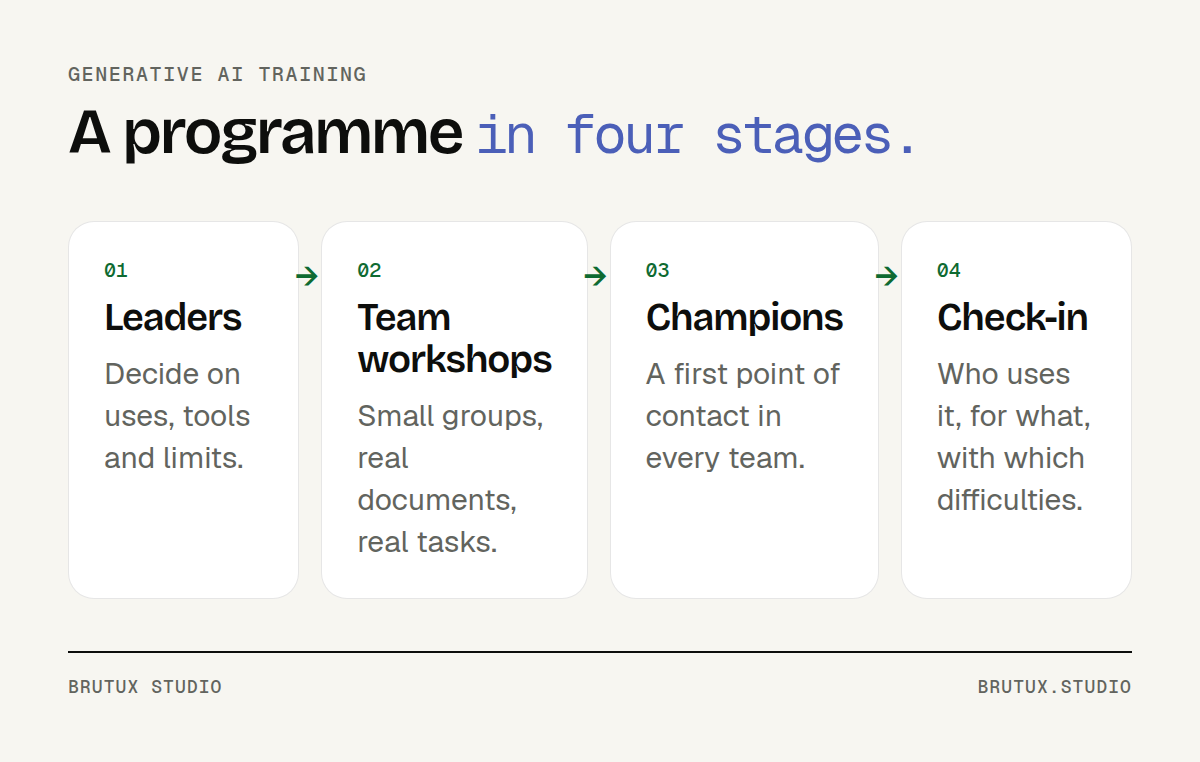 The training programme in four stages.
Start with leadership
Leadership needs to decide before the teams are trained: which tools are approved, which data is off limits, which uses are encouraged. Without these decisions, workshops run into questions nobody can answer.
A short session is often enough: what generative AI can do, where it goes wrong, the legal and reputational risks, and the questions to settle. If the company has not yet chosen its priority uses, an AI strategy engagement can come before the training.
Train by role, in small groups
Small groups, organised by role, let everyone practise on their own documents and ask their own questions. Putting support, accounting and sales management in the same room means speaking precisely to nobody.
Differences in level matter too. The studies above show that beginners often gain the most; they also need to be shown where the tool goes wrong, without being discouraged.
Two short workshops a few days apart are better than one long day. In between, everyone tries it on their own work and comes back with their own questions, often the most useful ones.
Victor Michel, the studio’s founder, trained users unfamiliar with digital tools during the digitisation of judicial procedures for a Swiss public service. The principle is the same with AI: start from everyday gestures and support people until the tool becomes second nature.
Appoint champions
After the training, questions come up: an unexpected case, a doubt about some data, a request that produces nothing useful. One champion per team, trained further than their colleagues, becomes the first port of call and reports needs back.
The role takes a few more hours: going deeper into difficult cases, building reusable request templates, following changes to the approved tools.
It is often the best investment in the programme.
The right champion is not necessarily the most technical person. It is someone respected in their team, comfortable explaining things, and willing to say “I don’t know, I’ll find out”.
How do you know whether generative AI training worked?
The end of the session is not the right time to judge.
Participants are either enthusiastic or tired; neither tells you whether their practices will change.
Measure use, not satisfaction
A follow-up a few weeks later answers the real questions: who uses it, on which tasks, with which difficulties. A few short conversations with participants and champions are often enough.
- Use: the tasks where the tool has become a habit, and those where it was dropped.
- Errors: the cases where a wrong answer got through, and how it was caught.
- Request templates: the ones that work and deserve to be shared across the team.
- The policy: the rules that were misunderstood or need adding to.
This follow-up is also the time to adjust. A misunderstood rule is reworded, an effective template is shared, a team that has fallen behind gets an extra workshop.
Finally, the CNIL flags a risk to watch over time: the loss of skills linked to excessive use of the tool (CNIL). A good follow-up checks that teams can still do, without the assistant, the tasks that require it.
What the AI Act asks about AI literacy
In the European Union, Article 4 of the AI Act asks providers and deployers of AI systems to take measures to support the AI literacy of their staff, taking into account their knowledge, experience and the context of use (AI Act Service Desk).
In its consolidated version, amended by the Digital Omnibus, the text states that it does not require any specific level of AI literacy to be guaranteed for each person, and provides for support from Member States and the Commission, in particular for SMEs (AI Act Service Desk). A company that trains its teams on their real uses, and keeps a record of the programme, meets the spirit of the text.
The studio’s training takes place at your premises, in Haute-Savoie, Geneva or Lausanne, or remotely; our page on AI consulting in Thonon-les-Bains describes our local support. Successful training shows in one simple thing: a few weeks later, your teams use the tool better, and know when to do without it.
Sources
- MIT Sloan, How generative AI can boost highly skilled workers’ productivity
- NBER, Brynjolfsson, Li and Raymond, Generative AI at Work
- CNIL, Questions and answers on using a generative AI system (in French)
- AI Act Service Desk, Article 4: AI literacy