
Custom business software makes sense when the process to be supported is what sets you apart, or when off-the-shelf tools force your teams to work around them every day. In other cases, an off-the-shelf SaaS is almost always faster and less risky. The decision is made on your real process, your own cases and the contract, not on a demo.
The question comes up in many small and mid-sized companies: should you subscribe to the tool everyone uses, or have your own designed? Here are the criteria that settle it, the legal points people forget, and a simple method to decide without regretting your choice two years later.
Custom business software or SaaS: what is the real difference?
Both options produce a tool your teams use every day. What changes is what you buy, what you own and who decides what happens next.
What you buy with SaaS
SaaS is software sold to many customers on a subscription. The vendor hosts it, maintains it and develops it according to its own roadmap.
You benefit from a product that is already proven and updated without any project on your side. In return, you adopt its logic: its screens, its fields, its steps and its development priorities.
Configuration lets you adjust a lot, but rarely the structure of the process itself. If the way you work departs from what the vendor planned for, your teams are the ones who adapt.
The quality of a SaaS also depends on its vendor: its soundness, the pace of its updates, the responsiveness of its support. You can check these with existing customers, ideally in your own industry.
What you own with custom software
Custom software is designed for a single organisation. It follows your steps, your exceptions and your vocabulary, and connects to your other tools according to your rules.
You decide how it evolves: what ships first, what waits, what will never be built. Depending on the contract, the code and documentation are yours.
That freedom has a cost: a project to steer, decisions to make, maintenance to plan. Custom software takes your teams’ time, especially at the start, to explain their work and test the screens.
You also need to plan who will keep the tool alive after launch: fixes, small changes, security updates. Custom software with nobody to maintain it ages fast.
When is off-the-shelf SaaS the right choice?
In many situations, off-the-shelf software wins. Recognising this early avoids pointless development.
When your process looks like your industry’s
Accounting, payroll, invoicing, leave management, appointment booking: these processes look alike from one company to the next. Vendors have already invested years in them, and they build regulatory changes in for all their customers.
Vertical software, designed for a specific trade, goes further still. It can include traceability or control rules specific to a profession, which custom development would have to rebuild.
When the need is urgent, that argument weighs too. A subscription opens in a few days; a custom tool is delivered in stages, over several months.
The hidden cost of an almost-right tool
The trap is software that covers the essentials without quite fitting. On paper, it works. In practice, your teams keep a spreadsheet on the side, re-enter information and invent workarounds.
That cost appears on no invoice. You pay it in minutes lost every day, in copying errors and in dependence on the one person who still knows how to make the system work.
Before choosing a SaaS, look at what it does not do, and at what your teams will have to do by hand to make up for it. That is often where the comparison flips.
When is custom software justified?
Custom software is not a luxury. It becomes the sensible choice in three specific situations.
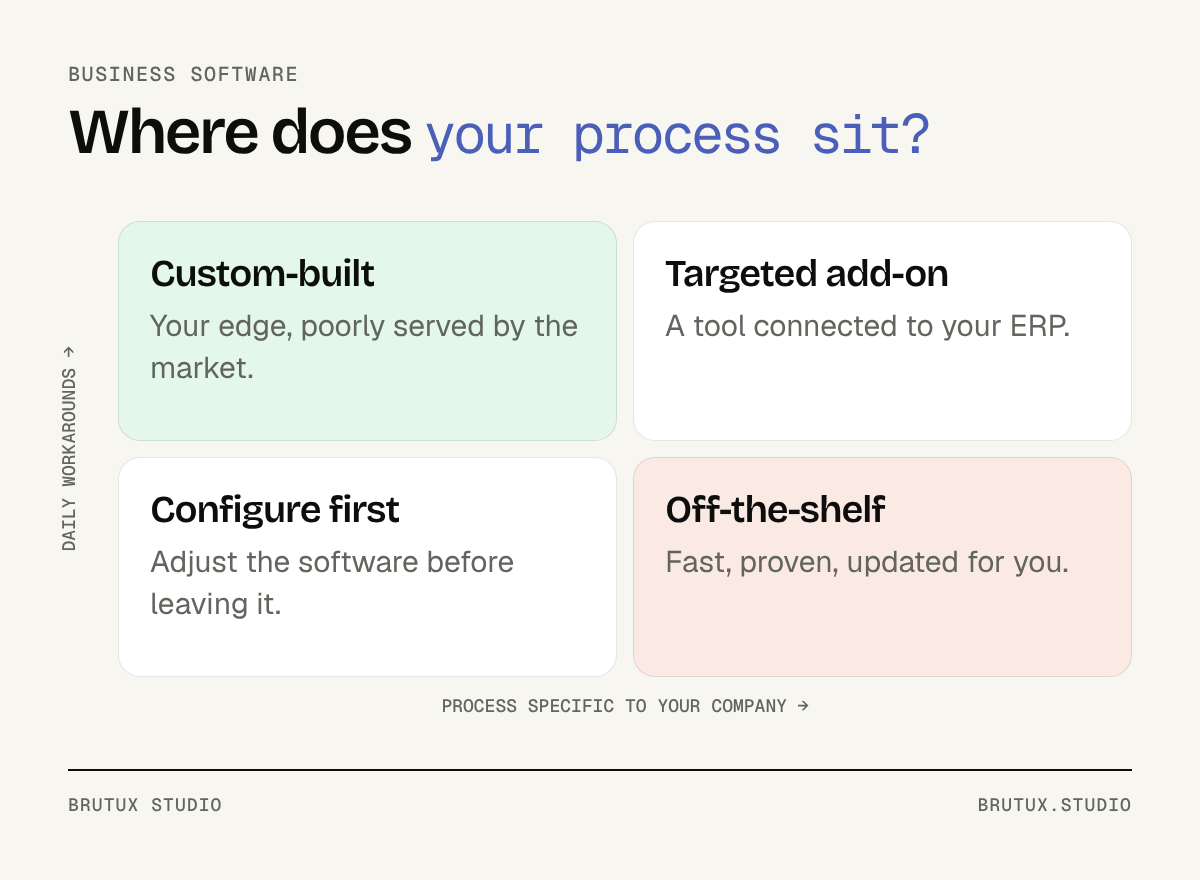 Where to place your process before choosing.
The process that sets you apart
Some companies win customers through a way of working others do not have: more rigorous case follow-up, faster response times, better-documented expertise. Forcing that process into the logic of generic software brings it down to the industry average.
A tool designed around that know-how strengthens it instead of diluting it. It keeps the steps that matter, removes those that add nothing, and makes quality more consistent from one colleague to the next.
The question to ask is simple: if a competitor used exactly the same tool as you, would you lose anything? If the answer is yes, that process deserves a closer look.
When workarounds become the rule
A shared Excel file that has become central, several versions in circulation, a single person able to fix it: this is the most common sign that a tool is missing. The off-the-shelf products you tried did not solve the problem, or merely moved it.
In that case, the spreadsheet is a goldmine. Its tabs, the columns added over the years and its formulas tell the story of the real process, exceptions included. It is an excellent starting point for designing the tool that will replace it.
The hybrid route: complement rather than replace
The decision is not always binary. Many companies keep their ERP or management software for accounting, stock or invoicing, and have a business application built for the process it handles poorly.
The two exchange data, and nobody re-enters anything. For a smaller company it is often the most sensible route: keep what works, build what is missing. Our custom business software page details this approach, from observing the field to going live.
Which data and contract questions need settling?
Comparisons talk about features and timelines. They rarely talk about the contract, which nonetheless weighs heavily over several years.
With SaaS: your data at the vendor’s
When a vendor provides a turnkey solution and actually processes personal data on your behalf, France’s data protection authority, the CNIL, treats it as your processor under the GDPR, in its page Responsable de traitement et sous-traitant : 6 bonnes pratiques.
The contract must then contain the mandatory terms of Article 28(3) of the GDPR: the subject matter, duration, nature and purpose of the processing, and the categories of data and of people concerned. The CNIL also points out that the vendor may only engage another processor with written authorisation, case by case or in general terms.
In practice, ask for the vendor’s list of sub-processors, where your data is hosted and how you will be told about a change. These answers matter as much as the feature list.
Switching providers: what the Data Act changes
Leaving a SaaS is easier than it used to be. According to an opinion from Arcep, the French telecoms regulator, the EU Data Act has applied since 12 September 2025 to providers of data processing services, which include cloud service providers.
The same opinion explains that, from 11 January 2024 to 12 January 2027, these providers may charge switching fees, provided they do not exceed the costs directly linked to the switch. From 12 January 2027, such fees will be prohibited.
That does not settle everything. Getting your data back in a usable format, with its history and attachments, remains a question to ask before signing, and to test on a real export.
Also ask the vendor how it applies these rules to your subscription, and have the exit clauses reviewed: notice period, export format, how long before data is deleted.
With custom software: who owns the code?
Software developed for you is not automatically yours. Under French law, Article L131-3 of the Intellectual Property Code requires each assigned right to be mentioned separately in the deed of assignment, and the scope of its exploitation to be defined.
So have it written down in black and white what comes to you: the source code, the documentation, access to servers and to third-party service accounts. Have the clause reviewed by a lawyer if the tool becomes critical to your business.
Without that precaution, you depend on the provider for the slightest change. With it, you can carry on with them, with another team or in-house.
How do you decide in practice?
The best decision is made on facts observed in your own company. Three steps are enough, and they are useful whatever you choose in the end.
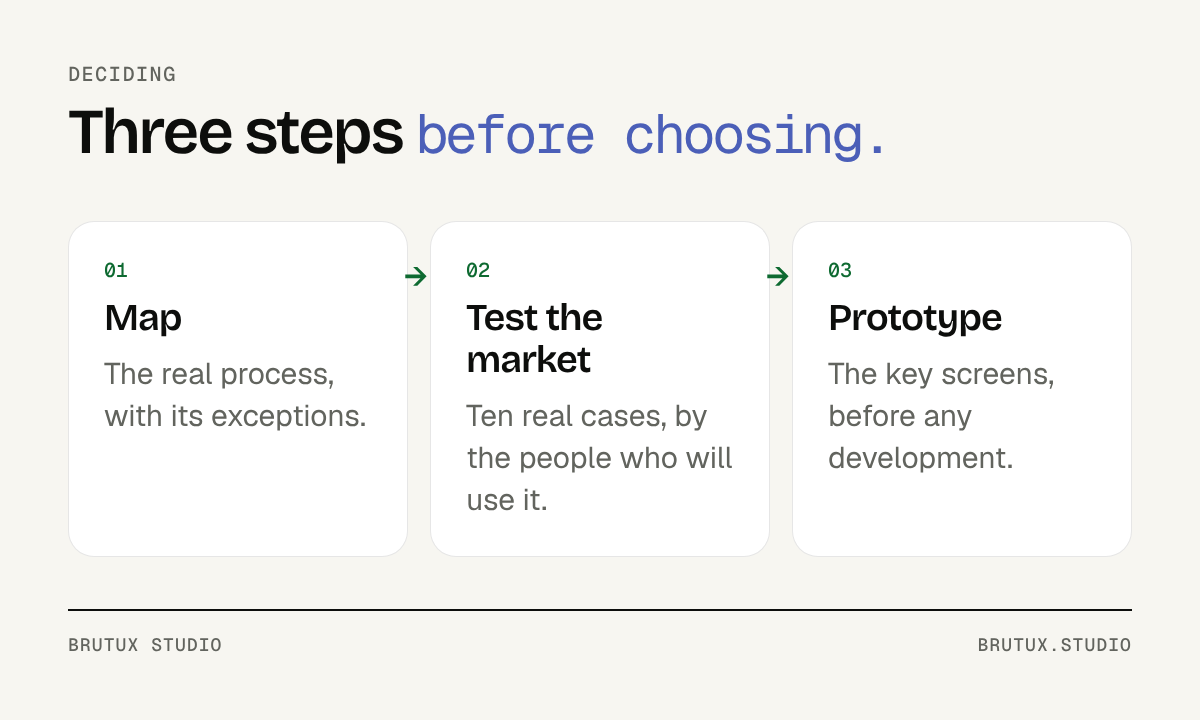 A three-step method, useful whatever you choose.
Map the process before comparing
Describe the process as it is actually lived, not as it appears in the procedures. Who does what, with which tools, at what moment, and where the double entry and the waiting happen.
Note the exceptions above all: the customer who pays in two instalments, the file that comes back for correction, the job cancelled the day before. These are what make a poorly chosen tool fail.
Half a day spent with the people who do the work often teaches more than several meetings with their managers. They know the detours nobody ever wrote down.
This map becomes your comparison grid. Without it, every demo looks convincing.
Test the off-the-shelf tool on your real cases
Ask for a trial, then run around ten real cases through the tool, including the exceptions you found. Let the people who will use the software every day do it, not just their manager.
Note what works naturally, what needs a workaround and what is impossible. If the essentials go through without effort, the SaaS is probably the right choice.
Compare at least two products this way. The gap between them quickly shows what really matters to your teams, and what was just a demo argument.
If workarounds pile up during the trial, they will not disappear after signing. That is the moment to consider a custom tool, or a targeted add-on.
Prototype before building
If custom software is taking shape, do not start development straight away. A prototype of the key screens, tested by future users in real situations, quickly reveals what is missing and what is superfluous.
Today’s tools make it possible to produce that prototype in a few days, as we explain in our article on the wireframe and the rapid prototype. It costs little, and it avoids building features nobody will use.
Development can then move forward one workflow at a time, starting with the most painful one today. Your teams use it before the project is over.
What does a tool built for one trade show?
A concrete example helps to see what custom software changes day to day, when it is justified.
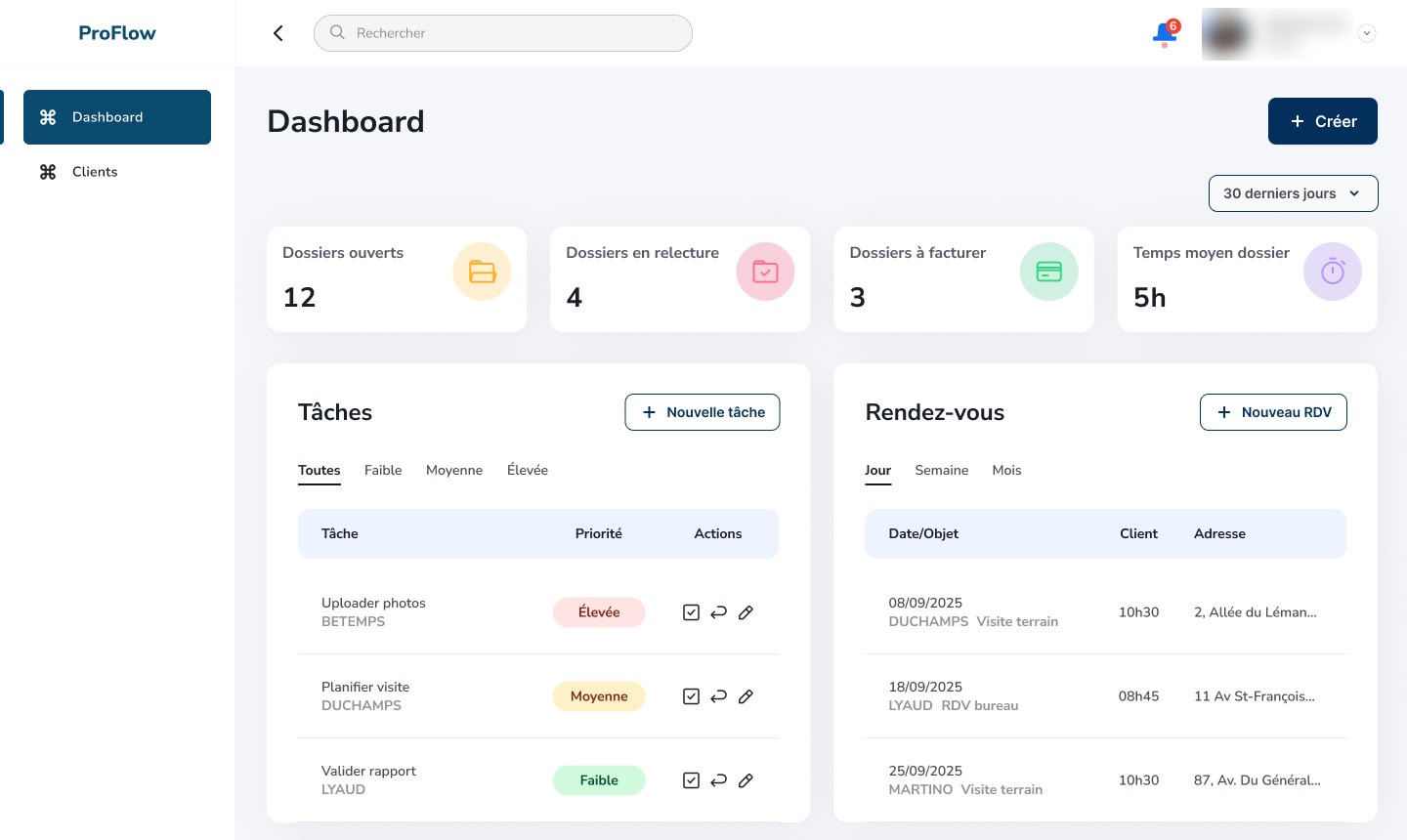 ProFlow, business software designed for a property valuation expert.
ProFlow, a valuation expert’s workstation
In 2025, a property valuation expert entrusted the studio with designing and developing a tool built around her practice. Her visit notes, photos, research and reports lived in tools that did not talk to each other.
Victor Michel, founder of the studio, led the project end to end: mapping the expert’s day-to-day work, designing the interface, then development. ProFlow now brings together note-taking during visits, AI-assisted research, report writing and the follow-up of several cases in parallel.
No off-the-shelf software followed this way of working, from the visit to the signed report. AI prepares the ground, the expert reviews and signs: it is the kind of use we also design for AI integration in existing software.
The key journeys were refined through the client’s feedback, in real conditions. That is the other side of custom software: time spent together so the tool truly follows the practice.
For companies in Geneva and French-speaking Switzerland, we run these projects in person and remotely, as our SaaS agency in Geneva page explains.
If you are torn between a subscription and a custom tool, the simplest thing is to talk it through: in 30 minutes, you will know which route deserves a closer look for your process.
Sources
- CNIL (French data protection authority), Responsable de traitement et sous-traitant : 6 bonnes pratiques pour respecter les données personnelles
- Arcep, Opinion no. 2025-0340 on the EU Data Act (switching charges)
- Légifrance, Article L131-3 of the French Intellectual Property Code