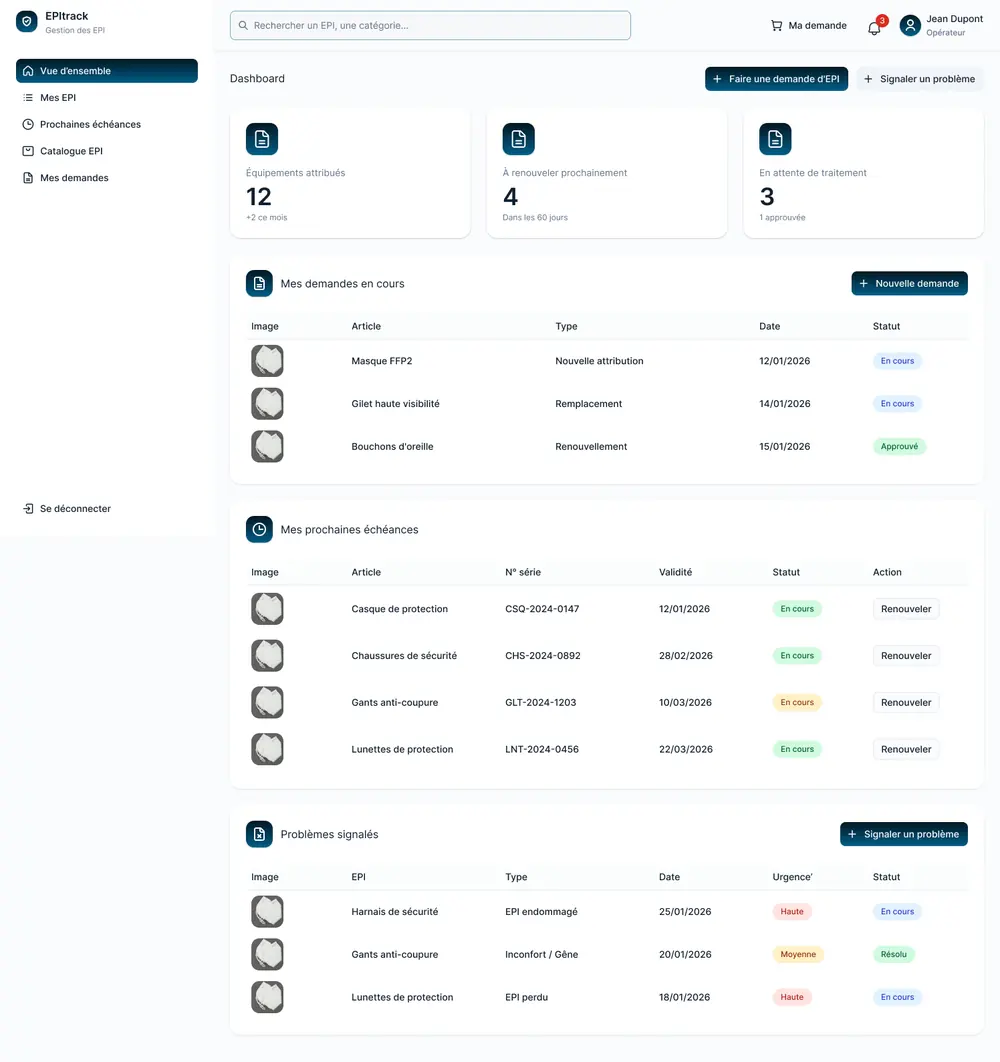
Brutux Studio designed EPItrack, a SaaS product for managing PPE, and its high-fidelity interactive prototype, built for client and investor demos.
B2B SaaS · Workplace safety
0→1
product designed from scratch
2
journeys: operator and administrator
Product design · UX/UI · Design system · Prototype
The context.
Helmets, gloves, harnesses, safety shoes: in many companies, personal protective equipment is still managed across spreadsheets and paper files. Assignments go untracked, inspection dates slip by unnoticed, and compliance becomes hard to prove on audit day.
EPItrack centralises the equipment fleet, tracks inspection deadlines, handles operator requests and incident reports, with a catalogue and standards-compliant product sheets. Brutux Studio has designed its full experience since 2025, along with a high-fidelity interactive prototype.
Victor Michel handled the framing, the information architecture, the design system and the screens. The prototype had to be polished enough to serve as a demo, in front of prospective clients and investors alike. In such meetings, a product people can click through themselves carries far more weight than a slide deck: everyone pictures their own use, asks concrete questions and leaves with a clear idea of what the tool would change for them.
The challenge: A regulatory need rarely has a good reputation: it brings forms and inspections to mind. The challenge was to turn it into a clear, even pleasant product for two audiences with opposite expectations: the operator, who wants their equipment without paperwork, and the administrator, who needs a reliable view of the whole fleet and its deadlines.
The approach.
01
Framing compliance and roles
The work started from a simple principle: make compliance visible and actionable day to day. The key moments in a piece of equipment’s life cycle, assignment, inspection, renewal, incident, were mapped for each of the two roles.
02
Designing two complementary journeys
The operator reviews their equipment, sees upcoming deadlines, makes a request or reports a problem in a few steps. The administrator runs the fleet, handles requests and anticipates inspections. Both journeys share the same data, seen from two angles.
03
Structuring the information
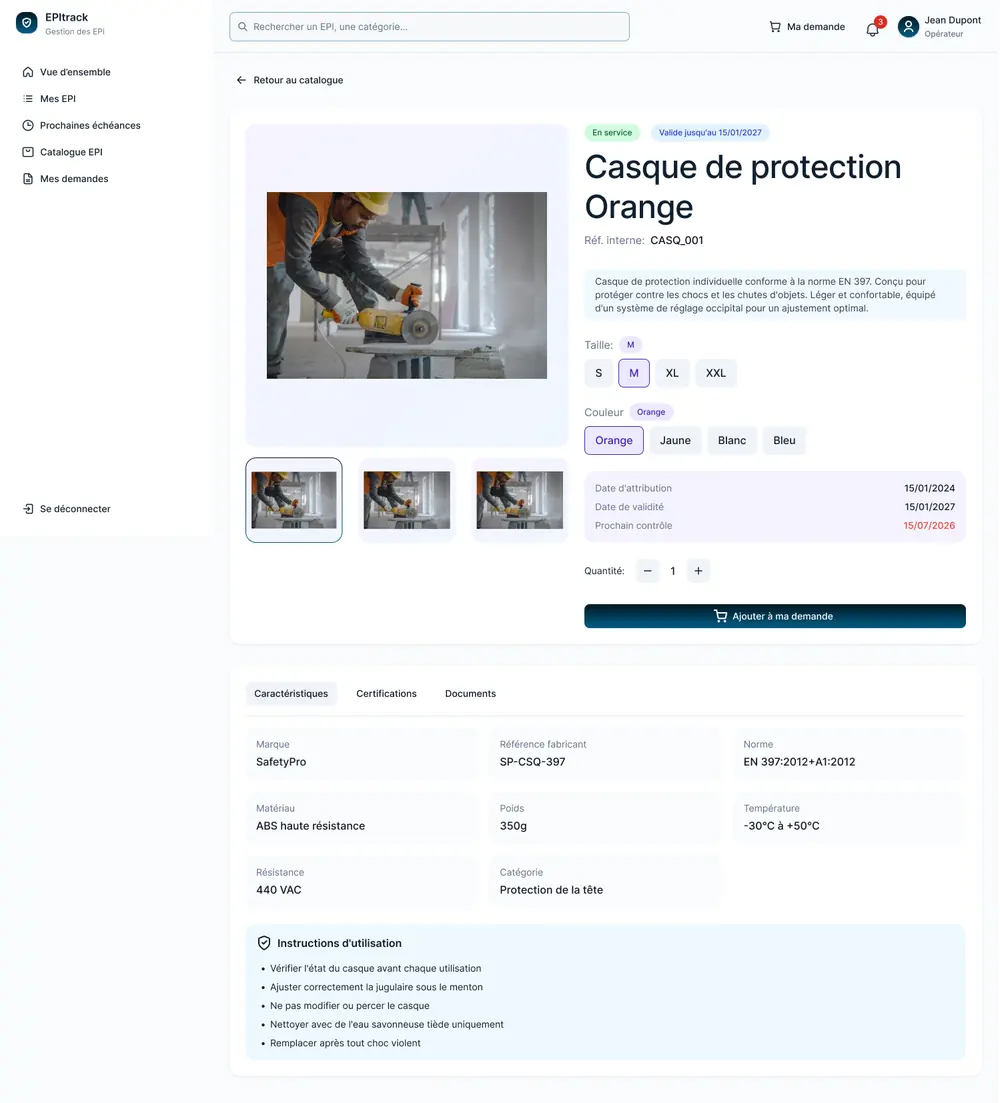
The information architecture is organised around the fleet, deadlines, requests and incidents. The catalogue and standards-compliant product sheets, with sizes and variants, prevent the assignment errors that are costly in safety terms.
04
Setting up a design system
A design system and component library cover the dashboard, tables, statuses, catalogue and product sheets. Urgency levels and statuses follow a consistent visual code, so an approaching deadline stands out without reading every row.
05
Delivering a prototype that convinces
The high-fidelity interactive prototype lets people click through the screens end to end, as in the final product. It serves as a demo and as a working basis for development: developers find in it the expected behaviour, the component states and the exact sequence of screens.
The screens.
EPItrack: standards-compliant product sheet for a safety helmet
What this project taught
EPItrack shows that a regulatory constraint can become the heart of a simple experience. Starting from compliance, then asking what each user needs at each moment, produces a clearer interface than one that piles up mandatory fields. A credible prototype also saves precious time: it replaces long explanations with a demonstration.
What it means for your project
Are you preparing a SaaS product or business software and need to convince clients or investors before investing in development? Brutux Studio designs the information architecture, the design system and a realistic interactive prototype, ready to be shown, tested, then built.